Claude Code Skills System -- Usage Guide
Skills are the extensible capability engine of Claude Code, allowing you to define custom automated workflows using Markdown files.
What Are Skills · Six Sources · Definition Format · Invocation · Execution Context · Conditional Activation · Permissions · Quick Reference
1. What Are Skills?
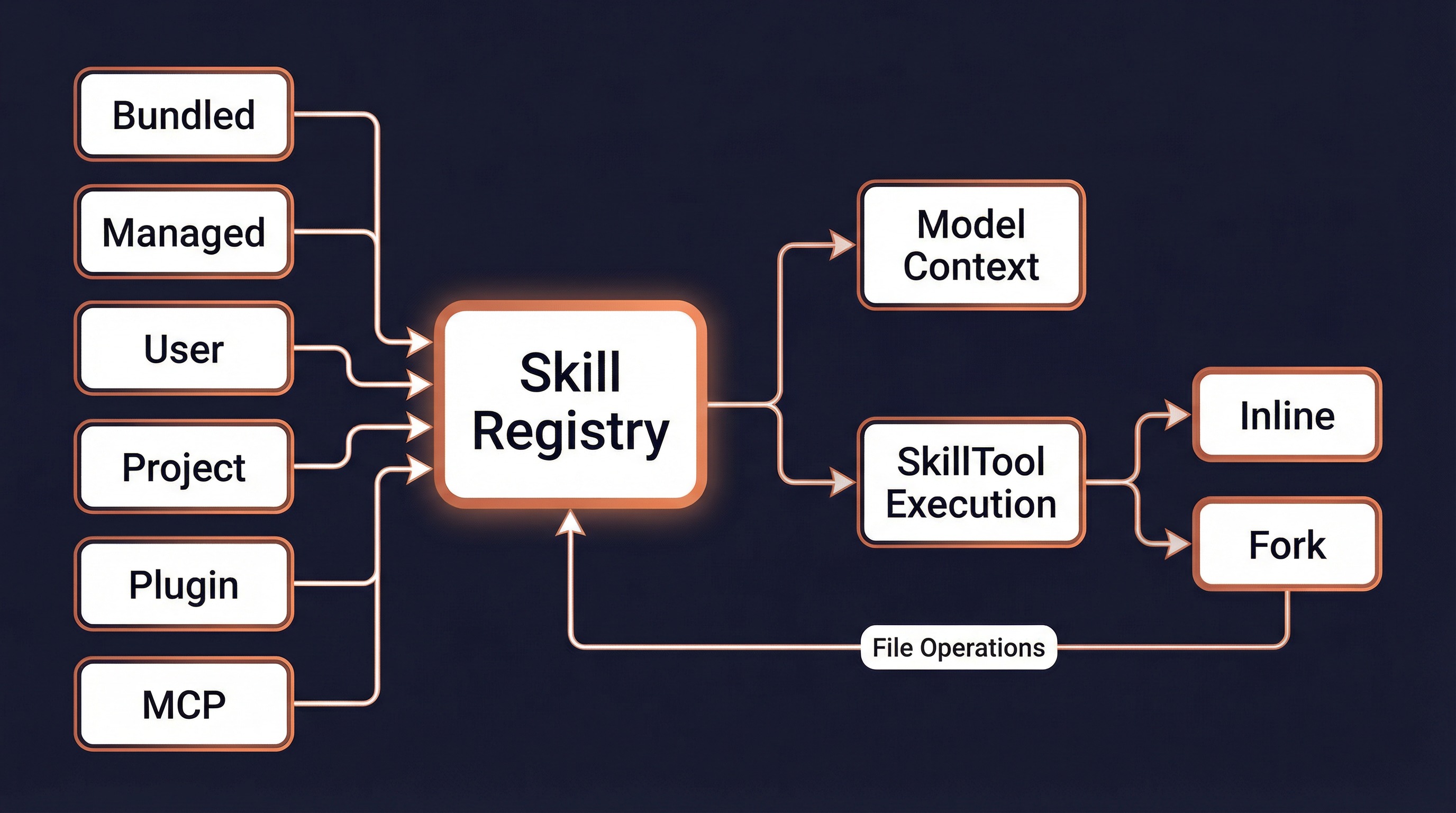
Skills are Claude Code's extensible capability plugin system. Each Skill is a Markdown file (with YAML frontmatter) that defines a specialized prompt and behavioral configuration, enabling Claude to execute professional workflows in specific scenarios.
Core capabilities:
| Capability | Description |
|---|---|
| Specialized Workflows | Define standard processes for code review, TDD, debugging, etc. |
| Tool Permission Control | Restrict a Skill to only use specified tools |
| Model Switching | Assign different models to different Skills |
| Execution Isolation | Fork mode runs in an isolated sub-agent |
| Conditional Activation | Activate only when specific files are being operated on |
| Hook Injection | Automatically register lifecycle hooks when a Skill is invoked |
2. Six Skill Sources
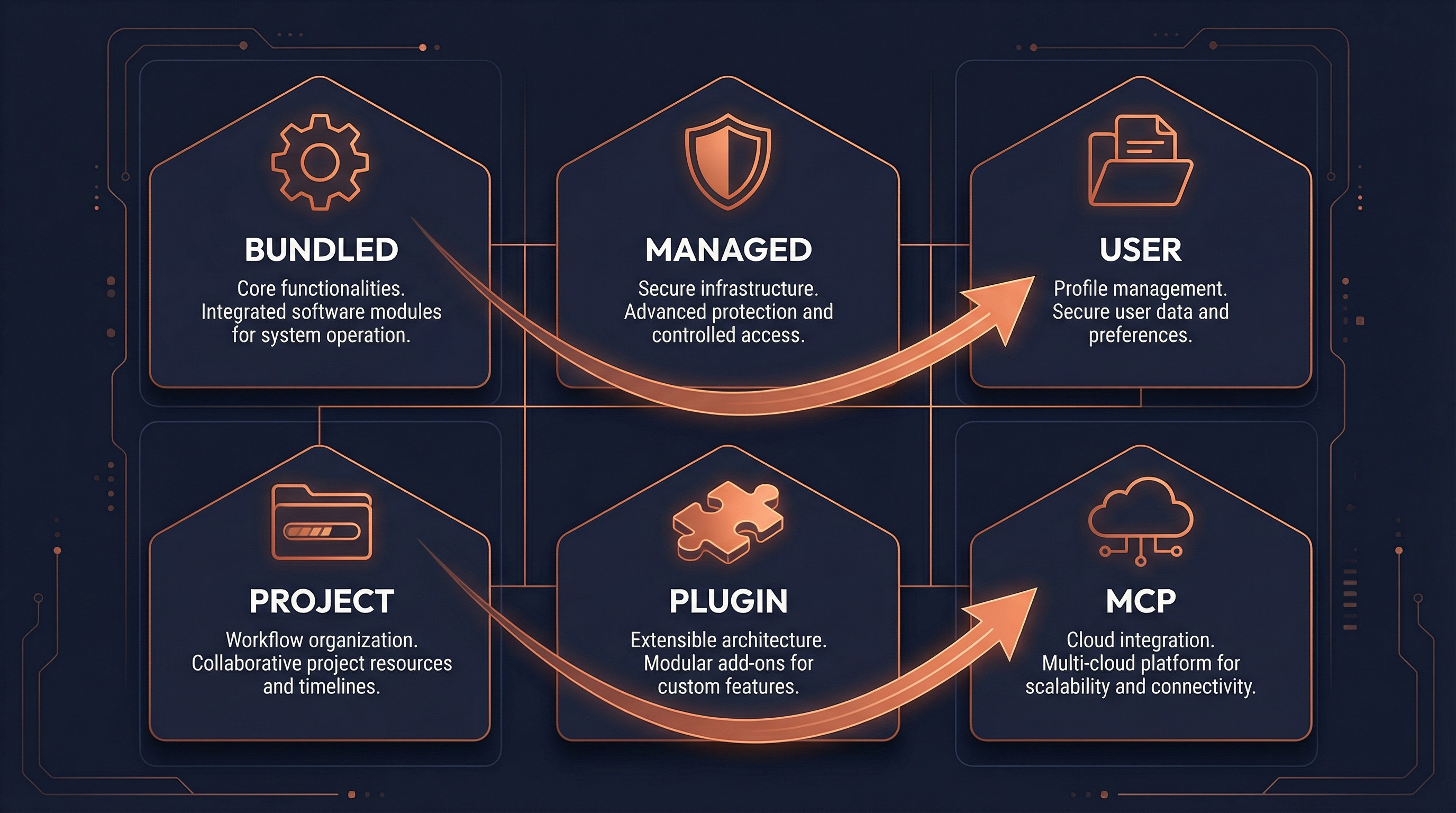
Claude Code loads Skills from 6 different sources, ordered by priority from highest to lowest:
1. Bundled (Built-in Skills)
Compiled into the CLI binary and available to all users. Defined in TypeScript and registered via registerBundledSkill().
Current Built-in Skills:
| Skill | Description | Special Conditions |
|---|---|---|
/verify | Verify code changes | -- |
/debug | Debugging assistant | -- |
/simplify | Code simplification review | -- |
/remember | Memory management | Requires auto-memory enabled |
/batch | Batch processing | -- |
/stuck | Help when stuck | -- |
/skillify | Create a new Skill | -- |
/keybindings | Custom keyboard shortcuts | -- |
/loop | Timed loop tasks | AGENT_TRIGGERS feature gate |
/schedule | Remote agent scheduling | AGENT_TRIGGERS_REMOTE feature gate |
/claude-api | Claude API integration | BUILDING_CLAUDE_APPS feature gate |
/dream | Automatic memory organization | KAIROS feature gate |
2. Managed (Policy-Managed Skills)
Controlled by organizational policies, stored in <managed-path>/.claude/skills/. Suitable for enterprise deployments.
3. User (User Skills)
Defined by individual users, stored in ~/.claude/skills/.
~/.claude/skills/
├── my-review/
│   └── SKILL.md          ← Main Skill file
├── deploy-check/
│   └── SKILL.md
└── ...
4. Project (Project Skills)
Defined at the project level, stored in .claude/skills/. Can be committed to version control.
your-project/
└── .claude/
    └── skills/
        ├── lint-fix/
        │   └── SKILL.md
        └── test-runner/
            └── SKILL.md
5. Plugin (Plugin Skills)
Provided by installed plugins. Plugins declare Skills directories via skillsPath / skillsPaths in their manifest.
Naming format: {pluginName}:{skillName}
Examples: superpowers:code-reviewer
          superpowers:brainstorming
6. MCP (MCP Server Skills)
Provided by connected MCP servers, naming format: mcp__server-name__prompt-name.
Security restriction: MCP Skills are from remote untrusted sources and are prohibited from executing !...`` inline shell commands.
3. Skill Definition Format
Directory Structure
Each Skill is a directory containing a SKILL.md file:
skill-name/
└── SKILL.md    ← Filename must be SKILL.md (case-insensitive)
Complete Frontmatter Fields
---
name: My Skill                       # Display name (optional, defaults to directory name)
description: What this skill does     # Description (required; auto-extracted from content if missing)
when_to_use: When to use this skill   # Usage scenario description (optional)
version: 1.0.0                       # Version number (optional)

# ── Invocation Control ──
user-invocable: true                  # Whether user can invoke via /skill-name (default: true)
disable-model-invocation: false       # Prevent model from invoking via Skill tool (optional)
argument-hint: "<file path>"          # Argument hint (optional)

# ── Execution Configuration ──
context: inline                       # Execution context: inline (default) or fork (sub-agent)
agent: general-purpose                # Agent type when forked (optional)
model: sonnet                         # Model override: haiku / sonnet / opus / inherit (optional)
effort: high                          # Thinking effort: low / medium / high / max (optional)
allowed-tools: "Bash, Read"           # Allowed tools (comma-separated or YAML list)
shell: bash                           # Shell type: bash (default) or powershell

# ── Conditional Activation ──
paths: "src/**/*.ts, test/**/*.ts"    # Glob patterns; activate only when matching files are operated on

# ── Lifecycle Hooks ──
hooks:
  PreToolUse:
    - matcher: "Bash"
      hooks:
        - command: "echo 'Before bash'"
          once: true                  # Execute only once
---

# Skill Body Content

This is the Markdown-formatted prompt that Claude sees when this Skill is invoked.

Supported special syntax:
- `${CLAUDE_SKILL_DIR}` — Expands to the Skill's directory
- `${CLAUDE_SESSION_ID}` — Expands to the current session ID
- `$ARGUMENTS` / `${ARG1}` — Argument substitution
- !`shell command` — Inline shell command execution
Frontmatter Field Reference
| Field | Type | Default | Description |
|---|---|---|---|
name | string | Directory name | Display name override |
description | string | Auto-extracted | Brief Skill description |
when_to_use | string | -- | Usage scenario description |
user-invocable | boolean | true | Whether user can invoke via /name |
disable-model-invocation | boolean | false | Prevent model invocation |
context | inline | fork | inline | Execution context |
agent | string | general-purpose | Agent type when forked |
model | string | Inherited | Model override (haiku/sonnet/opus) |
effort | string | int | -- | Thinking effort level |
allowed-tools | string | list | All | Allowed tools whitelist |
paths | string | list | -- | Conditional activation glob patterns |
shell | bash | powershell | bash | Shell command type |
hooks | object | -- | Lifecycle hook configuration |
argument-hint | string | -- | Argument hint text |
version | string | -- | Version number |
4. Invocation Methods
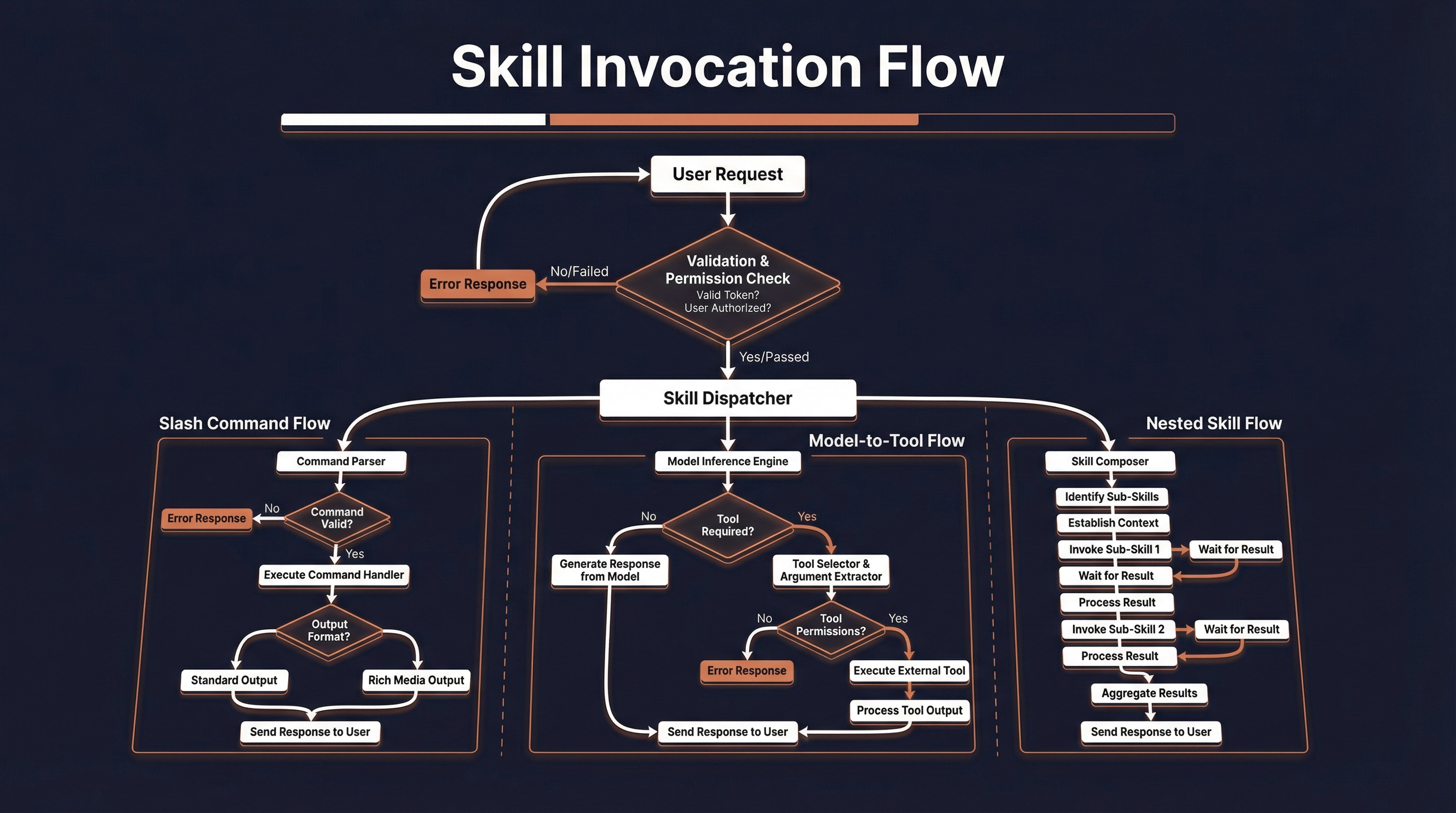
Method 1: User Slash Commands
Type /skill-name directly in the terminal:
> /commit
> /review-pr 123
> /verifyPrerequisite: The Skill's user-invocable must be true.
Method 2: Automatic Model Invocation
When Claude identifies a suitable Skill during conversation, it automatically invokes it via SkillTool:
User: Please review this code for me
Claude: [Invokes superpowers:code-reviewer via SkillTool]Prerequisite: The Skill's disable-model-invocation must not be true.
Method 3: Nested Invocation
One Skill can trigger another during execution:
/verify → internally invokes → /simplifyTracked in telemetry via invocation_trigger: 'nested-skill'.
Invocation Priority
When Skills with the same name exist in multiple sources, they are resolved in the following order (first match wins):
1. Bundled (built-in)           ← Highest priority
2. Built-in Plugin
3. Skill Dirs (user/project directories)
4. Workflow Commands
5. Plugin Commands
6. Plugin Skills
7. Built-in Commands            ← Lowest priority
5. Execution Context
Inline Mode (Default)
Skill content is expanded into the current conversation. Claude directly sees the prompt and executes within the same context.
context: inline # Default value, can be omittedCharacteristics:
- Shares the parent conversation's token budget
- Can access conversation history context
allowedToolsrestricts available tools for the current turnmodeloverrides the model used for the current turn
Fork Mode (Sub-Agent)
The Skill runs in an isolated sub-agent with its own independent token budget and context.
context: fork
agent: general-purpose   # Optional, specifies agent type
Characteristics:
- Independent token budget; does not consume the parent conversation's quota
- Isolated conversation context
- Can specify a different agent type (e.g.,
Bash,general-purpose) - Results are extracted and returned to the parent conversation upon completion
- Supports progress reporting (
onProgresscallback)
Comparison of Both Modes
| Feature | Inline | Fork |
|---|---|---|
| Token Budget | Shared with parent | Independent budget |
| Context Access | Full conversation history | Skill prompt only |
| Result Return | Directly in conversation | Text extracted into tool_result |
| Use Cases | Brief guidance, extended context | Long tasks, independent computation |
| Tool Restrictions | contextModifier modification | modifiedGetAppState |
6. Conditional Activation
Skills can use the paths frontmatter to implement on-demand activation, becoming visible to the model only when matching files are operated on.
Configuration
---
name: TypeScript Fix
description: Fix TypeScript type errors
paths: "src/**/*.ts, test/**/*.ts"
---
How It Works
1. All Skills are loaded at startup
2. Skills with paths are stored in the conditionalSkills Map (not exposed to the model)
3. When the user operates on a file (Read/Write/Edit)
4. activateConditionalSkillsForPaths() matches using the ignore library
5. On match → moved to the dynamicSkills Map → visible to model
6. Once activated, remains active for the entire session
Dynamic Discovery
In addition to conditional activation, Skills also support runtime discovery:
1. User operates on a file in a deeply nested directory
2. discoverSkillDirsForPaths() traverses upward from the file path
3. Looks for .claude/skills/ directories (not beyond cwd)
4. Skips directories ignored by .gitignore
5. New directory found → addSkillDirectories() → load and register
7. Permission Control
Auto-Allow
If a Skill contains only "safe properties" (no allowedTools, no hooks, no fork), it is automatically approved for execution without user confirmation.
Manual Confirmation
Skills with tool restrictions, hooks, or fork execution will prompt the user on first invocation:
Execute skill: my-custom-skill
Allow? (y)es / (n)o / (a)lways allow / (d)eny
Permission Rules
| Rule Type | Format | Description |
|---|---|---|
| Exact Allow | Skill:commit | Allow execution of the commit Skill |
| Prefix Allow | Skill:review:* | Allow all Skills with the review: prefix |
| Exact Deny | Skill:dangerous set to deny | Deny execution |
| Prefix Deny | Skill:untrusted:* set to deny | Deny all Skills with the untrusted: prefix |
Processing order: Deny rules → Allow rules → Safe property check → Ask user
8. Quick Reference
Creating a Skill
# 1. Create directory
mkdir -p ~/.claude/skills/my-skill

# 2. Create SKILL.md
cat > ~/.claude/skills/my-skill/SKILL.md << 'EOF'
---
name: My Skill
description: An example Skill
user-invocable: true
---

# Skill Content

Hello, this is my custom Skill.
EOF
Common Operations
| Operation | Method |
|---|---|
| Create a Skill | ~/.claude/skills/<name>/SKILL.md |
| Project-level Skill | .claude/skills/<name>/SKILL.md |
| Invoke a Skill | Type /skill-name in terminal |
| View available Skills | Type /skills in terminal |
| Create Skill with AI | /skillify |
| Restrict tools | Add allowed-tools in frontmatter |
| Fork execution | Add context: fork in frontmatter |
| Conditional activation | Add paths: "src/**" in frontmatter |
Skill Availability Matrix
| Source | User Invocable | Model Invocable | Supports Fork | Supports Hooks |
|---|---|---|---|---|
| Bundled | Per definition | Per definition | Yes | Yes |
| Managed | Yes | Yes | Yes | Yes |
| User | Yes (default) | Yes | Yes | Yes |
| Project | Yes (default) | Yes | Yes | Yes |
| Plugin | Per config | Per config | Yes | Yes |
| MCP | Per config | Per config | Yes | No (security restriction) |