Claude Code Agent Framework Deep Dive
Deconstructing the architecture behind the world's most popular AI code editor — from source code to design philosophy.
Core Loop · Prompt Engineering · Tool System · Context Management · Skills & Plugins · Permissions · Recovery · vs LangChain · Why It Works
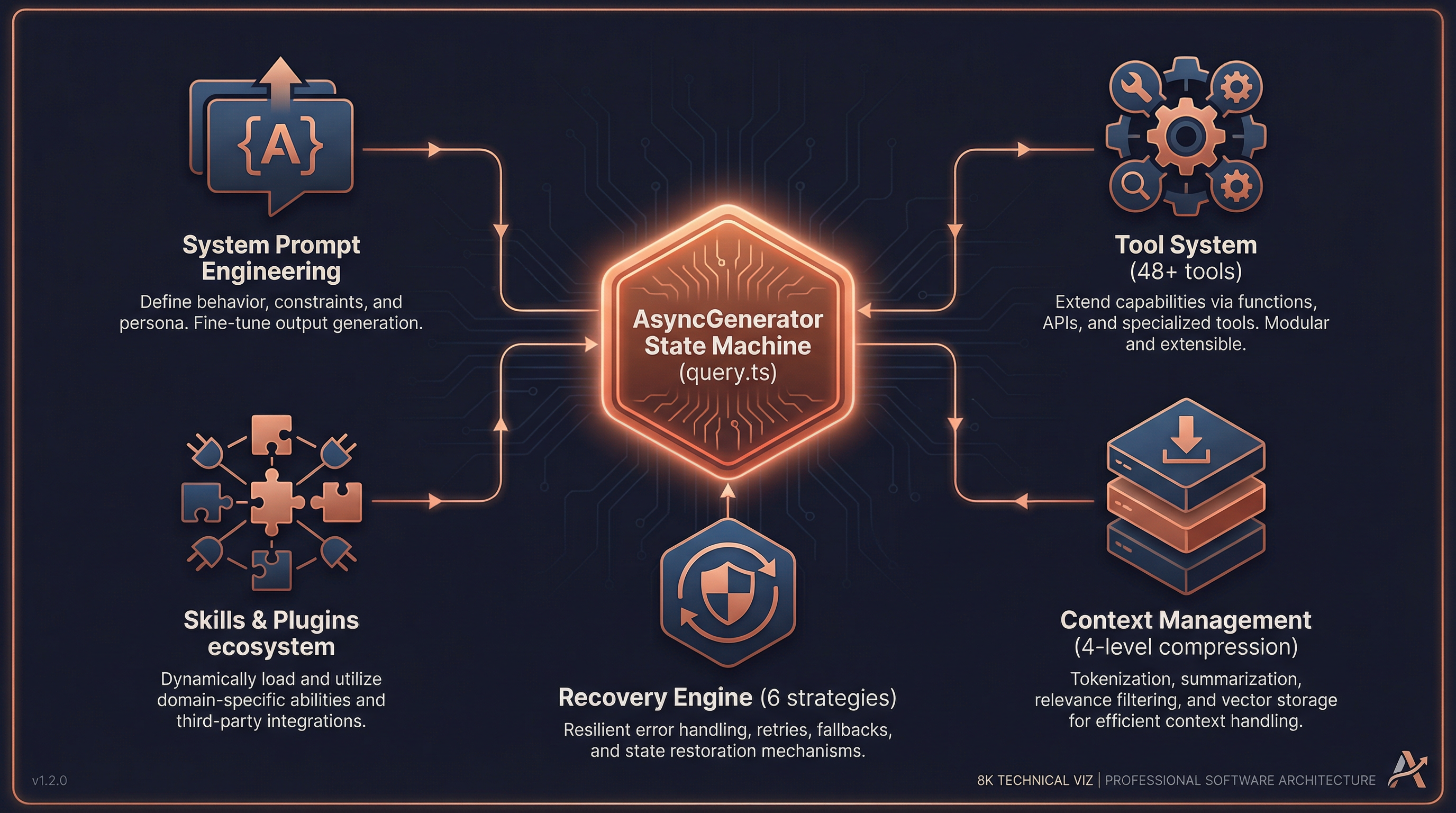
Preface: A Fundamental Question
If you observe Claude Code closely, you'll notice some remarkable behaviors:
- It can modify dozens of files in a single conversation with extremely few errors
- It automatically recovers from edge cases (token overflow, API timeouts, tool failures)
- It can simultaneously manage multiple subagents collaborating on complex tasks
- Long conversations don't degrade — they actually become more precise over time
Behind these capabilities lies a carefully engineered Agent framework. This document deconstructs that framework from the source code level, revealing its core design philosophy.
1. The Core Agent Loop
1.1 Not ReAct — An Async Generator State Machine
Most agent frameworks (including LangChain) adopt the classic ReAct pattern:
Thought → Action → Observation → Thought → ...Claude Code does not use this pattern. Its core is an async generator-driven state machine, defined in src/query.ts (~1730 lines):
// src/query.ts:219
export async function* query(params: QueryParams): AsyncGenerator<...>
This function is the heart of the entire agent. It's not a simple "think-act-observe" loop but a streaming state machine that yields messages in real-time and drives iteration through state assignment (not recursive calls).
1.2 The State Structure
// src/query.ts:204-217
type State = {
  messages: Message[]                    // Full conversation history
  toolUseContext: ToolUseContext          // Tool execution context
  autoCompactTracking: AutoCompactTracking  // Auto-compaction tracking
  maxOutputTokensRecoveryCount: number   // Output recovery counter
  hasAttemptedReactiveCompact: boolean   // Whether reactive compact was tried
  maxOutputTokensOverride: number        // Output token override
  pendingToolUseSummary: Promise<...>    // Pending tool summary
  stopHookActive: boolean               // Stop hook state
  turnCount: number                      // Conversation turn count
  transition: Continue | undefined       // Transition reason
}
1.3 Five Phases of the Core Loop
The entire while (true) loop (src/query.ts:307-1728) consists of five phases:
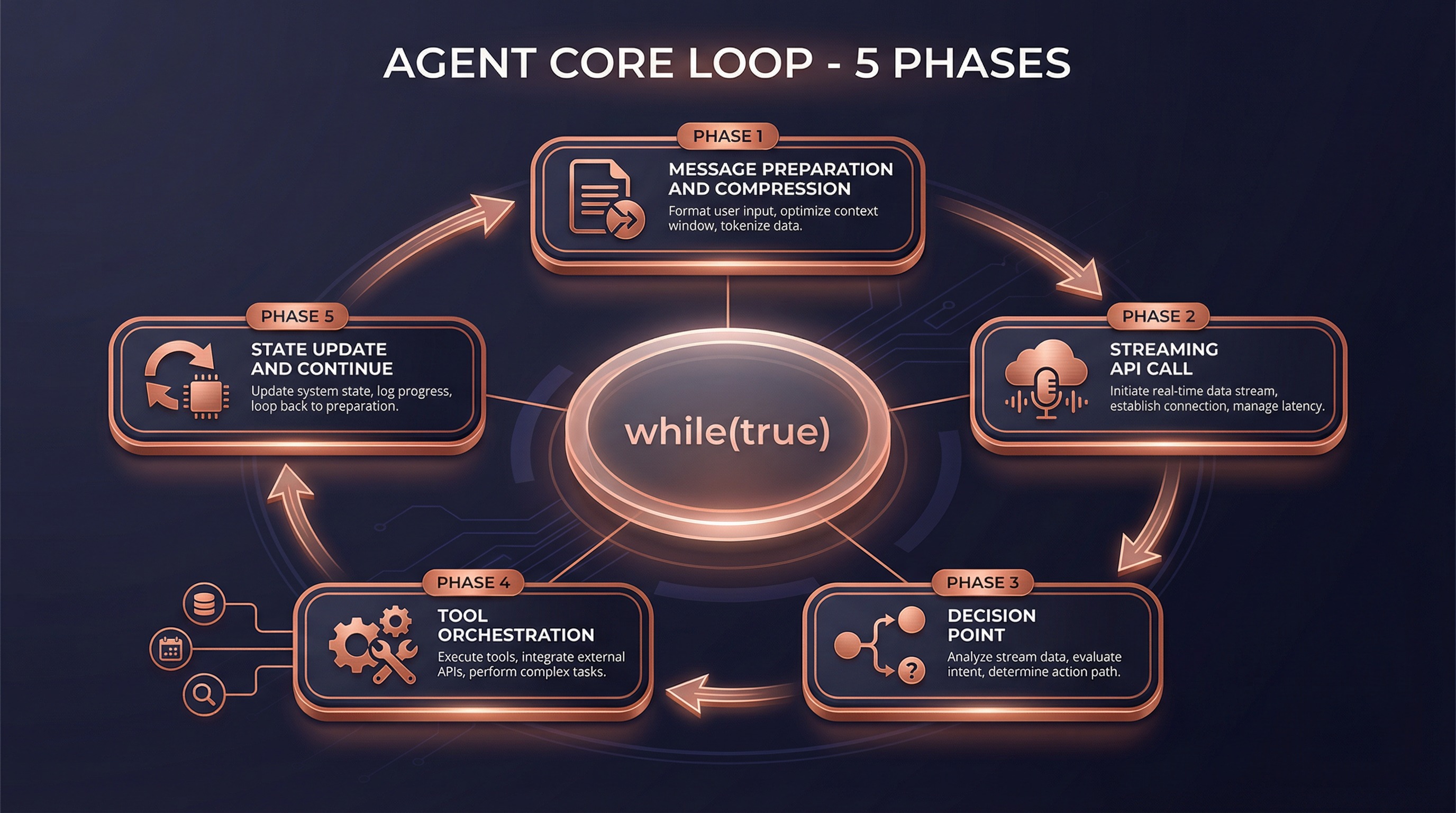
Phase 1: Message Preparation & Smart Compression (lines 365-543)
Before calling the API, conversation history goes through four layers of compression:
| Compression Strategy | Mechanism | Trigger |
|---|---|---|
| Snip Compression | Smart deletion of redundant tokens in old messages | Every turn |
| Micro Compression | In-place modification of cached message content | Every turn |
| Context Collapse | Staged summarization of historical messages | When context nears limit |
| Auto Compact | Full summary generation via Claude | When context is critically low |
This is the key to Claude Code handling extremely long conversations without degradation — it doesn't simply truncate history, but intelligently compresses while preserving critical information.
Phase 2: Streaming API Call (lines 652-954)
// src/query.ts:659-708
for await (const message of deps.callModel({
  messages: prependUserContext(messagesForQuery, userContext),
  systemPrompt: fullSystemPrompt,
  thinkingConfig,
  tools: toolUseContext.options.tools,
  signal: abortController.signal,
}))
Key design: tools begin executing during streaming, not after the model generates a complete response. This is achieved through StreamingToolExecutor — when the model generates tool_use blocks, tools start running immediately.
Phase 3: Decision Point (lines 1062-1358)
Model response complete
  │
  ├─ Has tool calls? ──→ Continue loop (Phase 4)
  │
  └─ No tool calls?  ──→ Run stop hooks → Check token budget → Return result
Phase 4: Tool Orchestration (lines 1363-1409)
Tool execution isn't simple sequential invocation — it uses a carefully designed orchestration strategy (src/services/tools/toolOrchestration.ts):
Tool call list
  │
  ├─ Partition: read-only vs. write
  │
  ├─ Read-only tools ──→ Parallel execution (up to 10 concurrent)
  │
  └─ Write tools ──→ Serial execution (prevent race conditions)
Phase 5: State Update & Loop (lines 1704-1728)
This is the most elegant part of the design — driving the loop through state assignment rather than recursive calls:
// src/query.ts:1715-1728
const next: State = {
  messages: [...messagesForQuery, ...assistantMessages, ...toolResults],
  toolUseContext: toolUseContextWithQueryTracking,
  autoCompactTracking: tracking,
  turnCount: nextTurnCount,
  transition: { reason: 'next_turn' },
}
state = next
// Back to top of while(true) loop
No recursion, no callback hell — just simple state = next followed by continue. This guarantees:
- Memory stability: No stack overflow from deep recursion
- State traceability: Every transition reason is recorded
- Controllable recovery: Errors at any phase can be recovered by modifying state
2. System Prompt Engineering
2.1 Layered Construction Architecture
The system prompt isn't a static string — it's dynamically assembled through a layered pipeline (src/constants/prompts.ts:444-577):
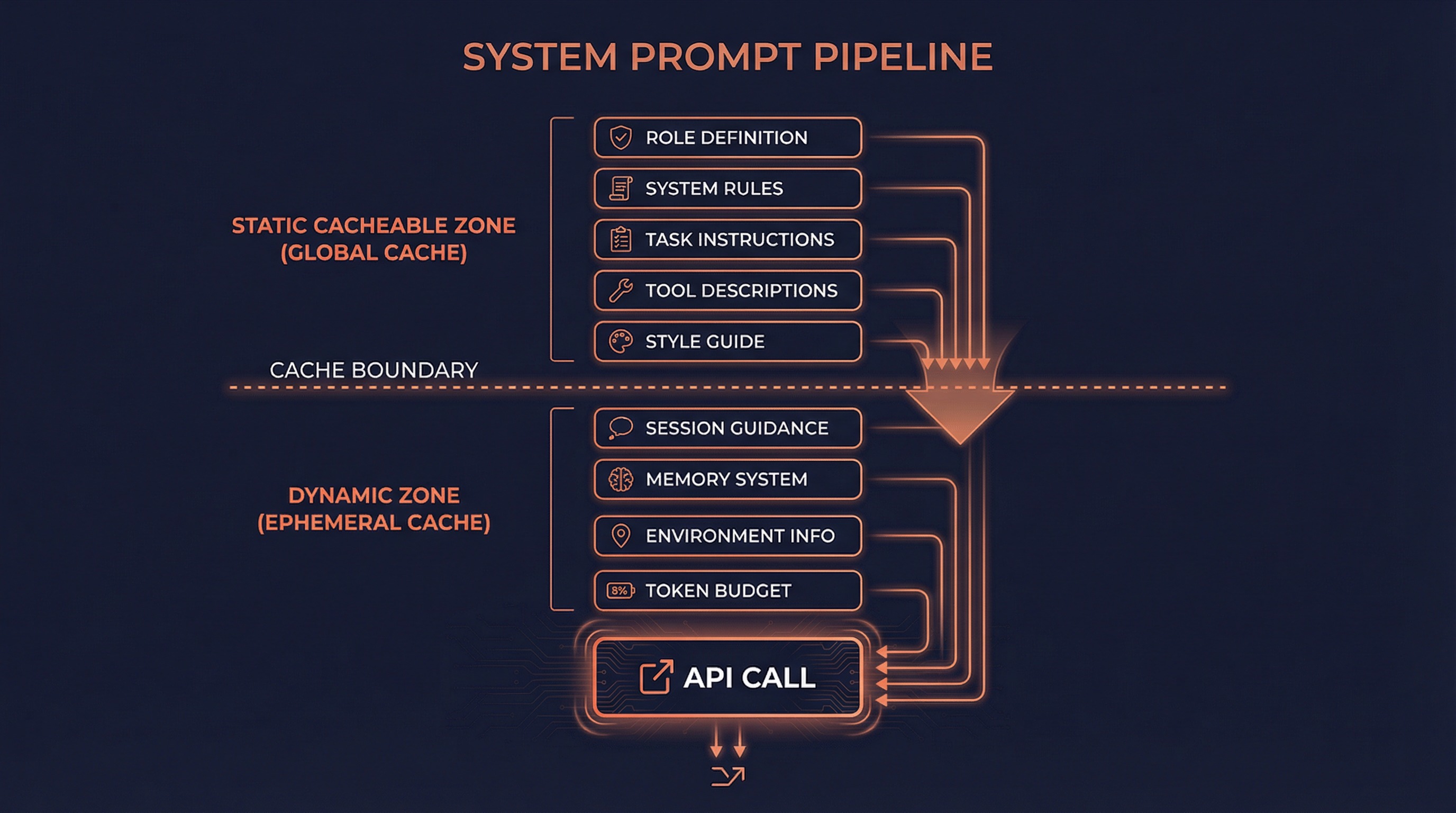
┌─────────────────────────────────────────────────────────────┐
│                    Static Cacheable Zone                      │
│  ┌───────────────────────────────────────────────────────┐  │
│  │ Role Def │ System Rules │ Task Guide │ Tool Desc │ Style│  │
│  └───────────────────────────────────────────────────────┘  │
├─────────────────────── Cache Boundary ──────────────────────┤
│                    Dynamic Variable Zone                      │
│  ┌───────────────────────────────────────────────────────┐  │
│  │ Session Guide │ Memory │ Env Info │ MCP Instr │ Budget │  │
│  └───────────────────────────────────────────────────────┘  │
└─────────────────────────────────────────────────────────────┘
The cache boundary (SYSTEM_PROMPT_DYNAMIC_BOUNDARY) is a critical design element:
- Above the boundary: Content universal across users and organizations, cached with
scope: 'global' - Below the boundary: User/session-specific content, cached with
scope: 'ephemeral'
This means Claude Code's system prompt doesn't need to be reprocessed every time — the static portion is shared globally, dramatically reducing latency and cost.
2.2 Two Section Types
// src/constants/systemPromptSections.ts

// Type 1: Cached Section (computed once, reused for entire session)
systemPromptSection('memory', async () => {
  return buildMemoryLines()  // Load CLAUDE.md, memory files, etc.
})

// Type 2: Cache-Breaking Section (recomputed every turn)
DANGEROUS_uncachedSystemPromptSection('mcp_instructions', async () => {
  return getMcpInstructions()  // MCP servers may connect/disconnect mid-session
}, 'MCP servers can connect/disconnect mid-session')
2.3 CLAUDE.md Loading Mechanism
CLAUDE.md is the custom instruction system, loaded by priority from low to high (src/utils/claudemd.ts):
/etc/claude-code/CLAUDE.md          ← Global managed config (lowest priority)
  ↓
~/.claude/CLAUDE.md                 ← User-level global instructions
  ↓
project-root/CLAUDE.md              ← Project-level instructions
project-root/.claude/CLAUDE.md
project-root/.claude/rules/*.md
  ↓
project-root/CLAUDE.local.md        ← Local private instructions (highest priority)
Supports @path syntax for recursive file inclusion, with automatic circular reference prevention.
2.4 System Prompt Priority Resolution
The final system prompt is determined through buildEffectiveSystemPrompt() (src/utils/systemPrompt.ts:41-123):
- Override prompt — Complete replacement (used in loop mode)
- Coordinator prompt — Coordinator mode
- Agent prompt — Custom agent definition
- Custom prompt —
--system-promptCLI flag - Default prompt — Standard system prompt
- Append prompt — Always appended at the end
3. Tool System Design
3.1 Tools: More Than Function Calls
Claude Code's tools aren't simple "name + params + execute". Each tool is a complete lifecycle management unit (src/Tool.ts:362-695):
type Tool<Input, Output> = {
  // Identity
  name: string
  aliases?: string[]        // Backward-compatible old names
  searchHint?: string       // ToolSearch keyword matching

  // Capability declarations
  isEnabled(): boolean
  isConcurrencySafe(input): boolean   // Can run in parallel?
  isReadOnly(input): boolean          // Read-only operation?
  isDestructive(input): boolean       // Destructive operation?

  // Lifecycle
  validateInput(input, context)       // Input validation
  checkPermissions(input, context)    // Permission check
  call(input, context, ...)           // Actual execution

  // Output & rendering
  renderToolUseMessage(input)         // Render invocation info
  renderToolResultMessage(content)    // Render result info
  renderToolUseProgressMessage(...)   // Render progress
  mapToolResultToToolResultBlockParam()  // Map to API format

  // Smart features
  inputSchema: Zod schema             // Zod type validation
  maxResultSizeChars: number           // Result size threshold
  toAutoClassifierInput(input)         // Security classifier input
  getToolUseSummary?(input): string    // Tool usage summary
}
This design makes every tool self-describing, self-validating, and self-rendering — the framework doesn't need to understand tool internals, just call standard interfaces.
3.2 Tool Registration: Three-Stage Pipeline
Tool discovery and registration happens in three stages (src/tools.ts):
Stage 1: Base Tool Pool (getAllBaseTools)
  │  ~48 built-in tools
  │  + Feature-flag-gated conditional tools
  │
Stage 2: Filtering (getTools)
  │  Filter by permission mode
  │  Filter by REPL mode
  │  Filter by isEnabled()
  │
Stage 3: MCP Merge (assembleToolPool)
     + Dynamic tools from MCP servers
     Deduplication (built-in takes precedence)
     Sorting (cache stability)
3.3 Tool Execution Pipeline
Each tool invocation passes through a 7-step pipeline (src/services/tools/toolExecution.ts):
1. Tool Lookup → 2. Input Parsing (Zod) → 3. Custom Validation
       │
4. Pre-Tool Hooks → 5. Permission Check → 6. Actual Execution → 7. Post-Tool Hooks
Each step can interrupt, modify, or enhance the execution flow. This isn't a simple try { tool.call(input) } catch — it's a full middleware pipeline.
3.4 Deferred Tool Loading
Claude Code has 48+ built-in tools. Sending all tool definitions to the model on every API call would waste massive tokens. The solution:
// Tools can be marked for deferred loading
{
  shouldDefer: true,       // Only list name in ToolSearch
  alwaysLoad: false,       // Don't include full schema in initial prompt
  searchHint: "notebook"   // Search keywords
}
The model dynamically retrieves full definitions via the ToolSearch tool when needed. This dramatically reduces system prompt size.
4. Context Management & Compression
4.1 The Secret Behind Unlimited Conversations
Claude Code claims "conversations have no context limit." Behind this is a four-level compression system:
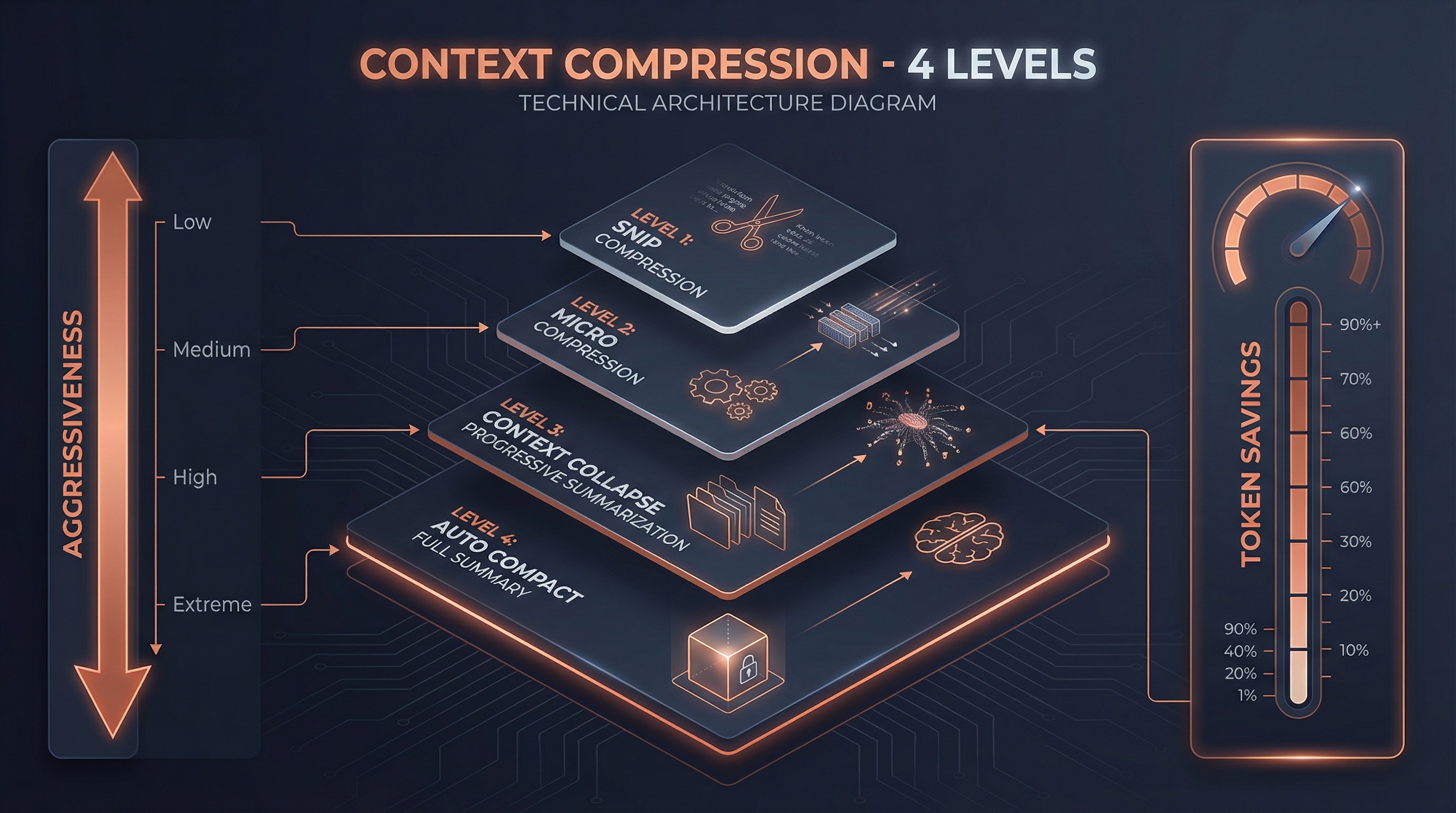
Level 1: Snip Compression
Smart trimming of processed messages — removes duplicate file content, overly long tool outputs, etc.
Level 2: Micro Compression
Modifies cached message content without changing the cache key. An "in-place optimization" strategy.
Level 3: Context Collapse
Staged summarization of historical messages. Not all-at-once summarization, but progressive folding — summarize the oldest messages first, keeping recent details intact.
Level 4: Auto Compact
When all local optimizations are insufficient, Claude itself generates a complete conversation summary that replaces all historical messages.
4.2 System Context Injection
Before every API call, two types of context are automatically injected (src/context.ts):
// System context (memoized, cached for entire session)
getSystemContext() → {
  gitStatus,           // Current branch, recent commits, file status
  cacheBreakerInjection  // System-level injection
}

// User context (memoized, cleared when CLAUDE.md changes)
getUserContext() → {
  claudeMdContent,     // Merged content from all CLAUDE.md files
  currentDate,         // Current date
  mcpInstructions      // MCP server instructions
}
4.3 System Reminders
System reminders are special attachment messages injected into tool results or user messages (src/utils/attachments.ts):
<system-reminder>
  System-level context information, unrelated to specific tool results.
</system-reminder>
Use cases include:
- Security warnings during file reads
- Memory staleness notifications
- Accompanying information for side questions
- Availability notices for deferred tools
5. Skills & Plugin Ecosystem
5.1 Skills System
Skills are one of Claude Code's most powerful extension mechanisms. They're not simple "command aliases" but complete AI behavior definitions.
Skill Definition Structure
type BundledSkillDefinition = {
  name: string
  description: string
  whenToUse?: string           // Model auto-determines when to use
  allowedTools?: string[]      // Restrict tool pool
  model?: string               // Specify model
  hooks?: HooksSettings        // Lifecycle hooks
  context?: 'inline' | 'fork'  // Inline or independent context
  agent?: string               // Associated agent type
  getPromptForCommand: (args, context) => Promise<ContentBlockParam[]>
}
Two Execution Contexts
| Context | Behavior | Use Case |
|---|---|---|
inline | Skill content expands directly into current conversation | Simple instructions, format templates |
fork | Skill runs as a subagent in an independent context | Complex workflows, independent token budget |
Skill Discovery Sources
Bundled skills (bundled)          ← Compiled into CLI, 15+
  ↓
Plugin skills (plugin)            ← Plugin-registered
  ↓
User skills (~/.claude/skills/)   ← User-global
  ↓
Project skills (.claude/skills/)  ← Project-level
  ↓
Policy skills (policy)            ← Organization-managed
5.2 Plugin System
Plugins are higher-level extension units that can contain skills, hooks, MCP servers, and LSP servers:
type BuiltinPluginDefinition = {
  name: string
  description: string
  skills?: BundledSkillDefinition[]     // Skill collection
  hooks?: HooksSettings                  // Lifecycle hooks
  mcpServers?: Record<string, McpServerConfig>  // MCP servers
  lspServers?: Record<string, LspServerConfig>  // LSP servers
  isAvailable?: () => boolean            // Availability check
  defaultEnabled?: boolean               // Default enabled state
}
The key plugin design: users can toggle enable/disable, unlike directly registered skills.
5.3 Hooks System
Hooks are programmable interception points across the entire lifecycle:
SessionStart → UserPromptSubmit → PreToolUse → [Tool Execution]
       │                                              │
       │                                          PostToolUse
       │                                              │
       └── SubagentStart ←── Stop ←── TaskCompleted ←─┘
              │
          SubagentStop → SessionEnd
Hooks execute as shell commands, with exit codes controlling behavior:
- 0: Success, stdout content processed per event type
- 2: stderr content shown to model or user
- Other: Shown to user only
5.4 MCP: Model Context Protocol
MCP is the standard protocol for Claude Code's interaction with the external world. Tool naming convention:
mcp__{normalized_server_name}__{tool_name}
e.g.: mcp__chrome_devtools__take_screenshot
Supported transports: stdio, sse, http, websocket, sdk
MCP tools are discovered at runtime and seamlessly merged into the unified tool pool alongside built-in tools.
6. Permission & Security Model
6.1 Layered Permission Model
┌─────────────────────────────────────┐
│         Permission Rules             │
│  Sources: userSettings, project,     │
│           flagSettings, policy       │
├─────────────────────────────────────┤
│         Permission Modes             │
│  default | plan | acceptEdits       │
│  bypassPermissions | auto | bubble  │
├─────────────────────────────────────┤
│              Hooks                   │
│  PreToolUse can intercept/modify    │
├─────────────────────────────────────┤
│      Security Classifier             │
│  ML model evaluates tool call safety│
└─────────────────────────────────────┘
6.2 Permission Decision Flow
Permission check for every tool invocation:
type PermissionResult =
  | { behavior: 'allow', updatedInput?, decisionReason }
  | { behavior: 'ask',  message, suggestions }
  | { behavior: 'deny', message, decisionReason }
  | { behavior: 'passthrough', message }
Decision reason traceability:
type: 'rule'— Matched a permission ruletype: 'mode'— Determined by permission modetype: 'hook'— Hook interceptiontype: 'classifier'— ML classifier decision
6.3 Permission Rule Pattern Matching
// Exact match
{ tool: 'Bash', behavior: 'deny' }

// Parameter pattern matching
{ tool: 'Bash(git *)', behavior: 'allow' }     // Allow all git commands
{ tool: 'Bash(rm -rf *)', behavior: 'deny' }   // Block rm -rf

// Wildcard
{ tool: 'File*', behavior: 'allow' }            // Allow all File* tools
7. Fault Recovery Mechanisms
This is one of Claude Code's most sophisticated designs. The core loop in src/query.ts has 6 built-in recovery strategies:
| Recovery Strategy | Trigger | Recovery Method |
|---|---|---|
collapse_drain_retry | Prompt too long | Drain staged context collapses, retry |
reactive_compact_retry | Still too long | Generate summary via Claude, retry |
max_output_tokens_escalate | Hit 8k default limit | Escalate to 64k limit, retry |
max_output_tokens_recovery | Hit any limit | Inject "continue" nudge, retry (up to 3x) |
stop_hook_blocking | Stop hook blocked | Inject blocking errors into context, retry |
token_budget_continuation | Budget remaining | Inject budget nudge, continue |
Each recovery works by modifying state:
// Example: prompt-too-long recovery
if (error.type === 'prompt_too_long') {
  // Drain all staged collapses
  const compacted = drainStagedCollapses(state.messages)
  state = { ...state, messages: compacted, transition: { reason: 'collapse_drain_retry' } }
  continue  // Back to loop top to retry
}
7.1 Model Fallback
When the primary model's stream fails, the system:
- Cleans up orphaned incomplete messages
- Switches to a fallback model
- Retries with the new model
7.2 Media Size Recovery
When images or other media cause token overflow:
- Triggers reactive compaction
- Automatically strips image content
- Retains text information and retries
8. How It Differs from LangChain/ReAct
8.1 Architecture Paradigm Comparison
| Dimension | LangChain | Claude Code |
|---|---|---|
| Core Pattern | ReAct (Think→Act→Observe) | Async Generator State Machine |
| Execution Model | Synchronous blocking | Streaming non-blocking |
| Tool Execution | After complete model response | During streaming |
| State Management | External Memory objects | Built-in state assignment + loop |
| Error Recovery | Manual orchestration required | 6 built-in recovery strategies |
| Context Compression | Simple truncation or summary | Four-level progressive compression |
| Multi-Agent | Chain/Graph explicit orchestration | Unified tool interface + state machine |
| Extension Mechanisms | Python class inheritance | Skills + Plugins + Hooks + MCP |
| Caching Strategy | None | Global / session / per-turn three-level cache |
8.2 Why Not ReAct?
The ReAct pattern has several inherent limitations:
- Serial bottleneck: Each step must wait for the complete "think→act→observe" cycle
- No streaming capability: Tools can't execute until the model completes its full response
- Recovery difficulty: No unified state representation makes automatic recovery hard
- Cache-unfriendly: Prompt structure changes significantly each cycle, making caching difficult
Claude Code's Async Generator pattern solves all these problems:
- Streaming execution: Tools run while the model generates
- Controllable state: The
Stateobject contains all needed info; recovery means just modifying state - Cache optimization: Static prompts cached globally, dynamic parts minimized
- Parallel capability: Read-only tools auto-parallelize, write tools serialize for ordering
8.3 Specific Differences from LangChain Agents
LangChain Agent:
  agent = initialize_agent(tools, llm, agent="zero-shot-react-description")
  result = agent.run("do something")
  # Internal: LLM → parse → tool → LLM → parse → tool → ... → final answer
  # Each step is an independent LLM call

Claude Code Agent:
  for await (const msg of query({ messages, tools, systemPrompt })) {
    yield msg  // Real-time message output
    // Internal: streaming LLM → streaming tool execution → state update → continue
    // A single API call can trigger multiple tools, which execute during streaming
  }
Key differences:
- Each LangChain "step" is a complete LLM call
- Each Claude Code "turn" can include multiple tool calls, with tools executing during streaming
- LangChain requires an OutputParser to parse tool calls from model output
- Claude Code directly uses Anthropic API's native
tool_usecapability — no parsing needed
8.4 Comparison with LangGraph
LangGraph is LangChain's evolution, introducing graph structures:
| Dimension | LangGraph | Claude Code |
|---|---|---|
| State Flow | Explicit graph nodes + edges | Implicit state machine (while + continue) |
| Visualization | Exportable as graph | Transition reasons are traceable |
| Persistence | Checkpoint + State | File system + message history |
| Human-in-Loop | interrupt_before/after | Permission system + hooks |
| Multi-Agent | Requires explicit orchestration | Unified AgentTool interface |
Claude Code's advantage is simplicity — no need to define graph structures; a single while loop handles everything.
9. Why Claude Code Is So Good
From source code analysis, we can distill these core design principles:
9.1 Streaming First
The entire architecture is designed around AsyncGenerator — everything is streamed:
- Model responses are streamed
- Tools execute during streaming
- Progress updates in real-time
- Compression strategies are progressive
Users never have to wait — they see the model thinking, tools executing, and results emerging.
9.2 Intelligent Caching
Three-level prompt caching system (src/services/api/claude.ts:3213-3237):
Global Cache (cross-org)      ← Static system prompt
  ↓
Ephemeral Cache (session)     ← Dynamic system prompt
  ↓
Section Cache (per-turn)      ← systemPromptSection memoization
This dramatically reduces latency and cost for every API call.
9.3 Graceful Degradation
Six recovery strategies ensure Claude Code almost never interrupts the user's workflow due to technical issues:
- Token overflow? Auto-compress
- API timeout? Auto-retry
- Model failure? Fall back to alternate model
- Tool failure? Log error, continue conversation
9.4 Minimal Abstraction Principle
Unlike LangChain's "abstract everything" philosophy, Claude Code's core has only:
- One loop (
while (true)inquery()) - One state (
Stateobject) - One interface (
Tooltype)
No Agent → AgentExecutor → Chain → Memory → Callback nesting layers. This makes the code easy to understand, debug, and extend.
9.5 Native API Integration
Claude Code directly leverages Anthropic API's native capabilities:
- Native tool calling: No OutputParser needed, directly uses
tool_useblocks - Native streaming: No wrapper layers, directly consumes SSE streams
- Native caching: Leverages API's prompt caching feature
- Native chain-of-thought: Directly uses extended thinking
This avoids the "framework tax" — the abstraction layer that frameworks like LangChain add between the LLM and the developer.
9.6 Tool-Driven Agent
Claude Code's philosophy: an agent's capability equals the capability of its tools.
- Spawn a subagent? That's a tool (
AgentTool) - Manage a team? That's a tool (
TeamCreate/SendMessage) - Edit a file? That's a tool (
FileEdit) - Execute a skill? That's a tool (
SkillTool)
All capabilities are exposed through the unified tool interface, and the model uses natural language reasoning to decide which tool to use. No explicit orchestration logic needed — the model itself is the orchestrator.
9.7 Deep Developer Experience Integration
Claude Code isn't "generic agent + code plugin" — it's deeply optimized for coding scenarios from the ground up:
- Git-aware: Automatically injects git status, understands branches, commits, diffs
- Filesystem-aware: Understands project structure, intelligently searches files
- Worktree isolation: Safe experimental modification environments
- LSP integration: Language Server Protocol provides type information and diagnostics
- MCP ecosystem: Connects to various external tools via standard protocol
10. Architecture Summary
Core Component Relationships
User Input
  │
  ▼
QueryEngine (src/QueryEngine.ts)
  │
  ├─ Build system prompt (prompts.ts + context.ts + claudemd.ts)
  ├─ Assemble tool pool (tools.ts + MCP)
  │
  ▼
query() async generator loop (src/query.ts)
  │
  ├─ Phase 1: Message compression (snip → micro → collapse → compact)
  ├─ Phase 2: Streaming API call (callModel + StreamingToolExecutor)
  ├─ Phase 3: Decision point (continue or complete)
  ├─ Phase 4: Tool orchestration (parallel read-only + serial write)
  └─ Phase 5: State update (state = next → continue)
       │
       ├─ Recovery strategies (6 types)
       ├─ Hook system (PreToolUse / PostToolUse / Stop / ...)
       └─ Subagent spawning (AgentTool → runAgent → new query() instance)
            │
            ├─ Synchronous foreground
            ├─ Async background (LocalAgentTask)
            ├─ Fork (inherit context)
            └─ Teammate (mailbox communication)
One-Line Summary
Claude Code's agent framework is a streaming state machine powered by AsyncGenerator, exposing all capabilities through a unified tool interface, combined with four-level context compression, three-level prompt caching, and six fault recovery strategies — an AI system that autonomously completes complex programming tasks without explicit orchestration.
11. Key Source File Index
| Component | File Path | Description |
|---|---|---|
| Core Loop | src/query.ts | Main agent loop (~1730 lines) |
| Query Engine | src/QueryEngine.ts | High-level wrapper (~687 lines) |
| Tool Definition | src/Tool.ts | Tool type system (~792 lines) |
| Tool Registry | src/tools.ts | Tool discovery and registration (~389 lines) |
| Tool Execution | src/services/tools/toolExecution.ts | Execution pipeline (~1500 lines) |
| Tool Orchestration | src/services/tools/toolOrchestration.ts | Parallel/serial strategy |
| System Prompt | src/constants/prompts.ts | Prompt assembly (~577 lines) |
| Prompt Sections | src/constants/systemPromptSections.ts | Section caching |
| Context Management | src/context.ts | System/user context |
| CLAUDE.md | src/utils/claudemd.ts | User instruction loading |
| Memory System | src/memdir/memdir.ts | Persistent memory |
| Agent Spawning | src/tools/AgentTool/AgentTool.tsx | Agent tool entry point |
| Agent Execution | src/tools/AgentTool/runAgent.ts | Agent execution logic |
| Fork Agent | src/tools/AgentTool/forkSubagent.ts | Fork cache optimization |
| Team Management | src/utils/swarm/teamHelpers.ts | Teams infrastructure |
| Mailbox Communication | src/utils/teammateMailbox.ts | Async message queue |
| Skills System | src/skills/bundledSkills.ts | Skill registration and management |
| Plugin System | src/plugins/builtinPlugins.ts | Plugin framework |
| Hook System | src/utils/hooks/hooksConfigManager.ts | Hook management |
| Permission System | src/utils/permissions/permissions.ts | Permission checking |
| State Management | src/state/AppStateStore.ts | Global state |
| Cost Tracking | src/cost-tracker.ts | API cost calculation |
| API Client | src/services/api/claude.ts | Anthropic API wrapper |
| MCP Client | src/services/mcp/client.ts | MCP protocol implementation |
| Coordinator Mode | src/coordinator/coordinatorMode.ts | Multi-agent orchestration |
| Remote Sessions | src/remote/RemoteSessionManager.ts | CCR connection management |
| Bridge | src/bridge/bridgeMain.ts | Remote bridge |
12. Further Reading
- Usage Guide — User-facing multi-agent manual
- Implementation Details — Technical deep dive into multi-agent orchestration
- Anthropic API Docs — Native API capabilities
- MCP Protocol Spec — Model Context Protocol