Claude Code Skills 系统 — 实现原理
深度剖析 Skills 如何被发现、加载、注入、执行和管理。
整体架构 · 发现与加载 · Frontmatter 解析 · 注入对话 · 执行引擎 · Fork 执行 · 条件激活 · Hook 集成 · 权限系统 · 完整生命周期 · 源码索引
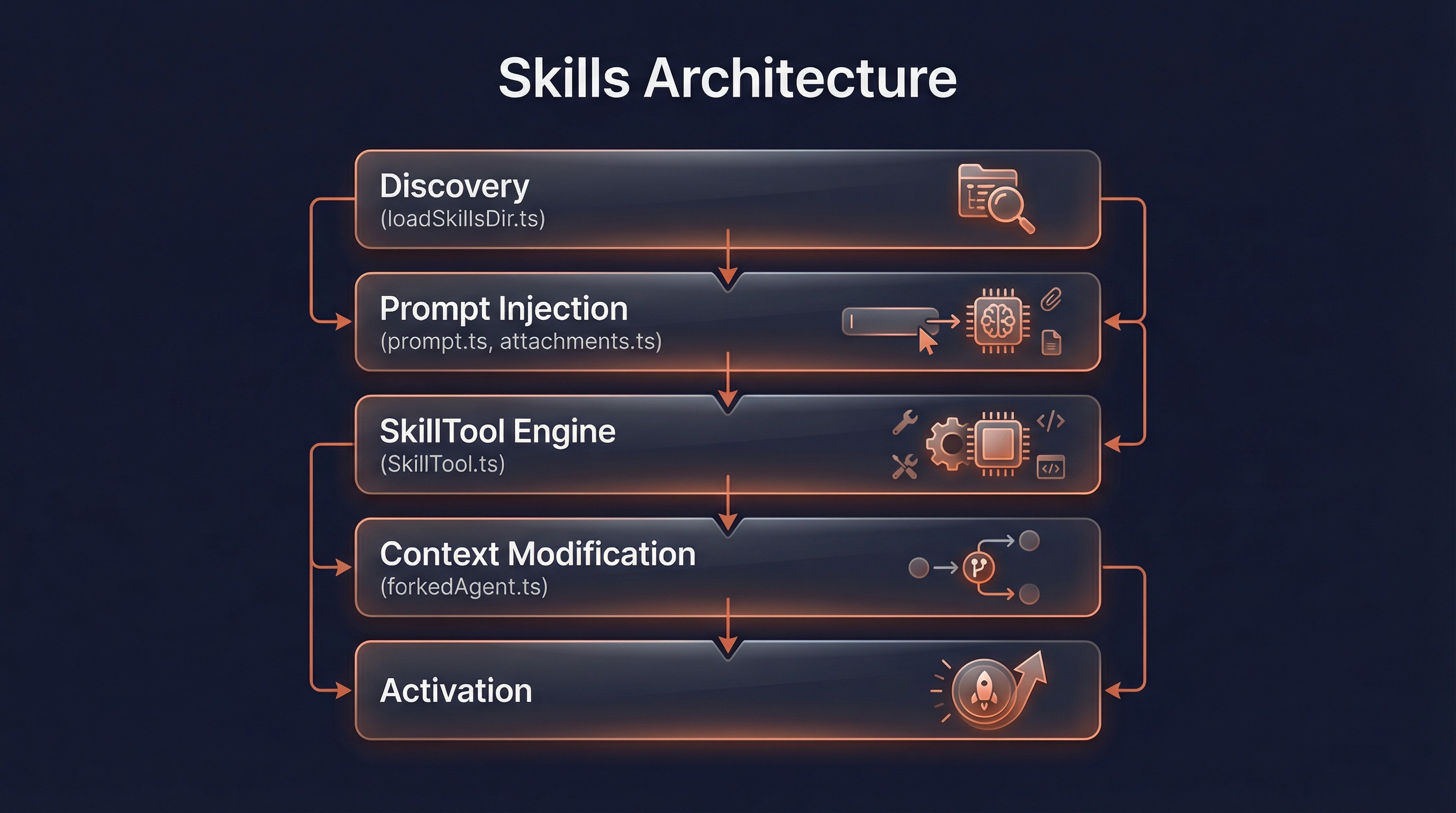
一、整体架构
Skills 系统由 5 个核心模块协同工作:
┌─────────────────────────────────────────────────────┐
│                   Skills 系统                        │
│                                                     │
│  ┌─────────────┐  ┌──────────────┐  ┌────────────┐ │
│  │  Discovery   │  │   Prompt     │  │  SkillTool │ │
│  │  发现 & 加载  │→│  注入 & 呈现  │→│  执行引擎   │ │
│  └─────────────┘  └──────────────┘  └────────────┘ │
│         ↑                                    ↓      │
│  ┌─────────────┐                     ┌────────────┐ │
│  │  Activation  │                     │  Context   │ │
│  │  条件激活    │←────────────────────│  上下文修改 │ │
│  └─────────────┘                     └────────────┘ │
└─────────────────────────────────────────────────────┘
模块职责
| 模块 | 核心文件 | 职责 |
|---|---|---|
| Discovery | loadSkillsDir.ts | 从 6 种来源发现和加载 Skills |
| Prompt | prompt.ts + attachments.ts | 将 Skill 列表注入 system-reminder |
| SkillTool | SkillTool.ts | 验证、权限检查、执行 Skill |
| Activation | loadSkillsDir.ts (后半段) | 条件激活和动态发现 |
| Context | forkedAgent.ts | 上下文准备和修改 |
二、Skill 发现与加载
加载入口
Skills 加载从 commands.ts 的 getSkills() 函数开始:
// src/commands.ts:351-396
async function getSkills(cwd: string) {
  const [skillDirCommands, pluginSkills] = await Promise.all([
    getSkillDirCommands(cwd),    // 目录 Skills(managed/user/project)
    getPluginSkills(),            // 插件 Skills
  ])
  const bundledSkills = getBundledSkills()          // 内置 Skills
  const builtinPluginSkills = getBuiltinPluginSkillCommands()  // 内置插件 Skills
  return { skillDirCommands, pluginSkills, bundledSkills, builtinPluginSkills }
}
聚合与排序
所有来源的 Skills 汇总到 loadAllCommands(),按优先级排列:
// src/commands.ts:447-467
const loadAllCommands = memoize(async (cwd: string): Promise<Command[]> => {
  return [
    ...bundledSkills,        // 1. 内置 Skills(最高优先级)
    ...builtinPluginSkills,  // 2. 内置插件 Skills
    ...skillDirCommands,     // 3. 目录 Skills(managed → user → project)
    ...workflowCommands,     // 4. Workflow 命令
    ...pluginCommands,       // 5. 插件命令
    ...pluginSkills,         // 6. 插件 Skills
    ...COMMANDS(),           // 7. 内建命令(最低优先级)
  ]
})
关键特性: 使用 memoize 缓存,避免重复磁盘 I/O。
目录 Skill 加载流程
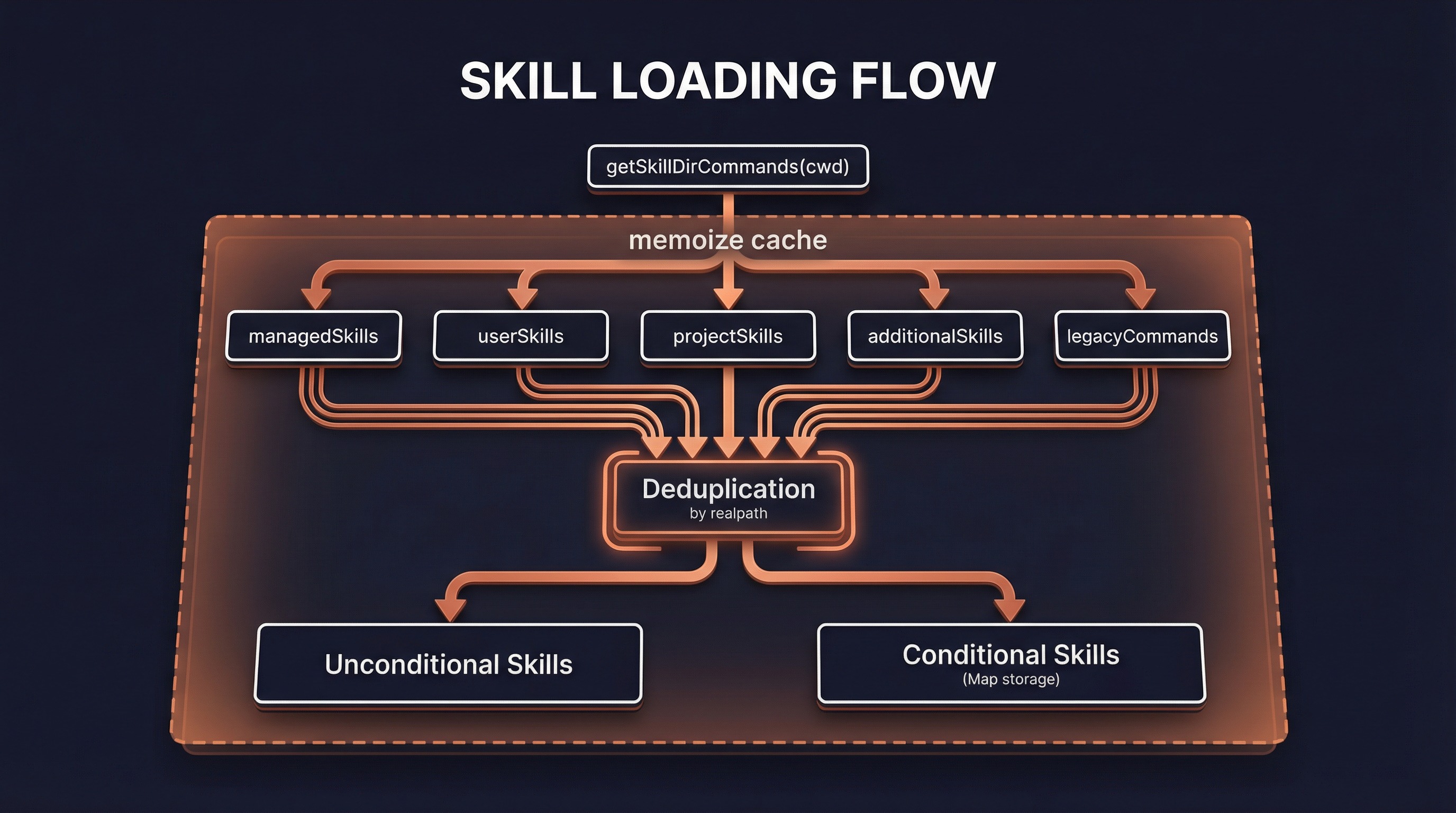
getSkillDirCommands() 是目录 Skills 的核心加载函数:
getSkillDirCommands(cwd)
├─ 确定加载路径
│  ├─ managed: ${MANAGED_PATH}/.claude/skills/
│  ├─ user:    ~/.claude/skills/
│  ├─ project: .claude/skills/ (向上遍历到 HOME)
│  └─ additional: --add-dir 指定的路径
│
├─ 并行加载(Promise.all)
│  ├─ loadSkillsFromSkillsDir(managedDir, 'policySettings')
│  ├─ loadSkillsFromSkillsDir(userDir, 'userSettings')
│  ├─ loadSkillsFromSkillsDir(projectDirs, 'projectSettings')
│  ├─ loadSkillsFromSkillsDir(additionalDirs, 'projectSettings')
│  └─ loadSkillsFromCommandsDir(cwd)  ← 兼容遗留 /commands/ 格式
│
├─ 去重(按 realpath)
│  └─ getFileIdentity(filePath) → realpath 解析符号链接
│     └─ seenFileIds Map,首次出现者胜出
│
└─ 分离条件 Skills
   ├─ 无 paths → unconditionalSkills(立即可用)
   └─ 有 paths → conditionalSkills Map(等待激活)
去重机制
// src/skills/loadSkillsDir.ts:725-763
const fileIds = await Promise.all(
  allSkillsWithPaths.map(({ skill, filePath }) =>
    skill.type === 'prompt'
      ? getFileIdentity(filePath)  // realpath() 解析符号链接
      : Promise.resolve(null),
  ),
)

const seenFileIds = new Map<string, SettingSource>()
for (const entry of allSkillsWithPaths) {
  const fileId = fileIds[i]
  const existingSource = seenFileIds.get(fileId)
  if (existingSource !== undefined) continue  // 跳过重复
  seenFileIds.set(fileId, skill.source)
  deduplicatedSkills.push(skill)
}
Bundled Skill 注册
内置 Skills 使用完全不同的注册路径:
// src/skills/bundledSkills.ts:53-100
export function registerBundledSkill(definition: BundledSkillDefinition): void {
  // 如果有 files,创建提取目录和延迟提取逻辑
  if (files && Object.keys(files).length > 0) {
    skillRoot = getBundledSkillExtractDir(definition.name)
    // 首次调用时提取文件到磁盘
    getPromptForCommand = async (args, ctx) => {
      extractionPromise ??= extractBundledSkillFiles(name, files)
      const extractedDir = await extractionPromise
      const blocks = await inner(args, ctx)
      return prependBaseDir(blocks, extractedDir)
    }
  }

  const command: Command = {
    type: 'prompt',
    source: 'bundled',
    loadedFrom: 'bundled',
    // ...其他字段
  }
  bundledSkills.push(command)
}
文件提取: Bundled Skills 可以携带 files: Record<string, string> 字段,首次调用时将这些文件提取到磁盘(getBundledSkillExtractDir()),让模型能通过 Read/Grep 访问。
启动注册
// src/skills/bundled/index.ts:13-58
export function initBundledSkills(): void {
  require('./verify.js').registerVerifySkill()
  require('./debug.js').registerDebugSkill()
  require('./remember.js').registerRememberSkill()
  // ...
  if (feature('AGENT_TRIGGERS')) {
    require('./loop.js').registerLoopSkill()     // 特性门控
  }
  if (feature('KAIROS')) {
    require('./dream.js').registerDreamSkill()    // 特性门控
  }
}
Plugin Skill 加载
插件系统
├─ loadAllPluginsCacheOnly()
│  └─ 获取所有已启用插件
│
├─ 每个插件:
│  ├─ 读取 manifest.skillsPath → 默认 Skills 目录
│  ├─ 读取 manifest.skillsPaths[] → 额外 Skills 目录
│  └─ loadSkillsFromDirectory() 加载 SKILL.md
│
├─ 命名空间:
│  └─ {pluginName}:{namespace}:{skillName}
│     例如: superpowers:code-reviewer
│
└─ 变量替换:
   ├─ ${CLAUDE_PLUGIN_ROOT} → 插件根目录
   ├─ ${CLAUDE_PLUGIN_DATA} → 插件数据目录
   ├─ ${CLAUDE_SKILL_DIR}   → 技能目录
   └─ ${user_config.X}      → 用户配置值
MCP Skill 加载
// src/services/mcp/client.ts:2030-2102
// MCP prompts 转换为 Command 对象
async function fetchCommandsForClient(client) {
  const prompts = await client.listPrompts()
  return prompts.map(prompt => ({
    type: 'prompt',
    name: `mcp__${normalizeNameForMCP(serverName)}__${prompt.name}`,
    source: 'mcp',
    loadedFrom: 'mcp',
    // getPromptForCommand 调用 MCP 服务器获取内容
  }))
}
特性门控: feature('MCP_SKILLS') 控制 MCP Skills 是否可用。
三、Frontmatter 解析
解析流程
SKILL.md 文件
    ↓
parseFrontmatter()              ← frontmatterParser.ts
    ├─ 分离 YAML frontmatter 和 Markdown 内容
    ├─ quoteProblematicValues()  ← 处理特殊字符(glob 模式等)
    └─ parseYaml()               ← 解析 YAML
    ↓
parseSkillFrontmatterFields()   ← loadSkillsDir.ts:185-265
    ├─ description 提取优先级:
    │  1. frontmatter.description 字段
    │  2. Markdown 第一个 # 标题
    │  3. 技能名称兜底
    ├─ parseUserSpecifiedModel()     ← 模型别名解析
    ├─ parseEffortValue()            ← 力度级别解析
    ├─ parseHooksFromFrontmatter()   ← Hook 配置验证
    ├─ parseBooleanFrontmatter()     ← boolean 字段解析
    └─ parseSlashCommandToolsFromFrontmatter() ← 工具列表解析
    ↓
createSkillCommand()            ← loadSkillsDir.ts:270-401
    └─ 生成 Command 对象(含 getPromptForCommand 闭包)
FrontmatterData 类型定义
// src/utils/frontmatterParser.ts:10-59
export type FrontmatterData = {
  'allowed-tools'?: string | string[] | null
  description?: string | null
  'argument-hint'?: string | null
  when_to_use?: string | null
  version?: string | null
  model?: string | null          // haiku, sonnet, opus, inherit
  'user-invocable'?: string | null
  'disable-model-invocation'?: string | null
  hooks?: HooksSettings | null
  effort?: string | null         // low, medium, high, max, 或数字
  context?: 'inline' | 'fork' | null
  agent?: string | null
  paths?: string | string[] | null
  shell?: string | null          // bash, powershell
  [key: string]: unknown
}
getPromptForCommand 闭包
每个 Command 对象都包含一个 getPromptForCommand 闭包,在调用时执行:
// src/skills/loadSkillsDir.ts:344-399
async getPromptForCommand(args, toolUseContext) {
  // 1. 添加基目录头
  let finalContent = baseDir
    ? `Base directory for this skill: ${baseDir}\n\n${markdownContent}`
    : markdownContent

  // 2. 参数替换
  finalContent = substituteArguments(finalContent, args, true, argumentNames)

  // 3. 技能目录变量替换
  if (baseDir) {
    finalContent = finalContent.replace(/\$\{CLAUDE_SKILL_DIR\}/g, skillDir)
  }

  // 4. 会话 ID 替换
  finalContent = finalContent.replace(/\$\{CLAUDE_SESSION_ID\}/g, getSessionId())

  // 5. 执行内联 Shell 命令(MCP Skills 跳过此步 — 安全限制)
  if (loadedFrom !== 'mcp') {
    finalContent = await executeShellCommandsInPrompt(finalContent, context)
  }

  return [{ type: 'text', text: finalContent }]
}
四、Skill 注入到对话
注入流程
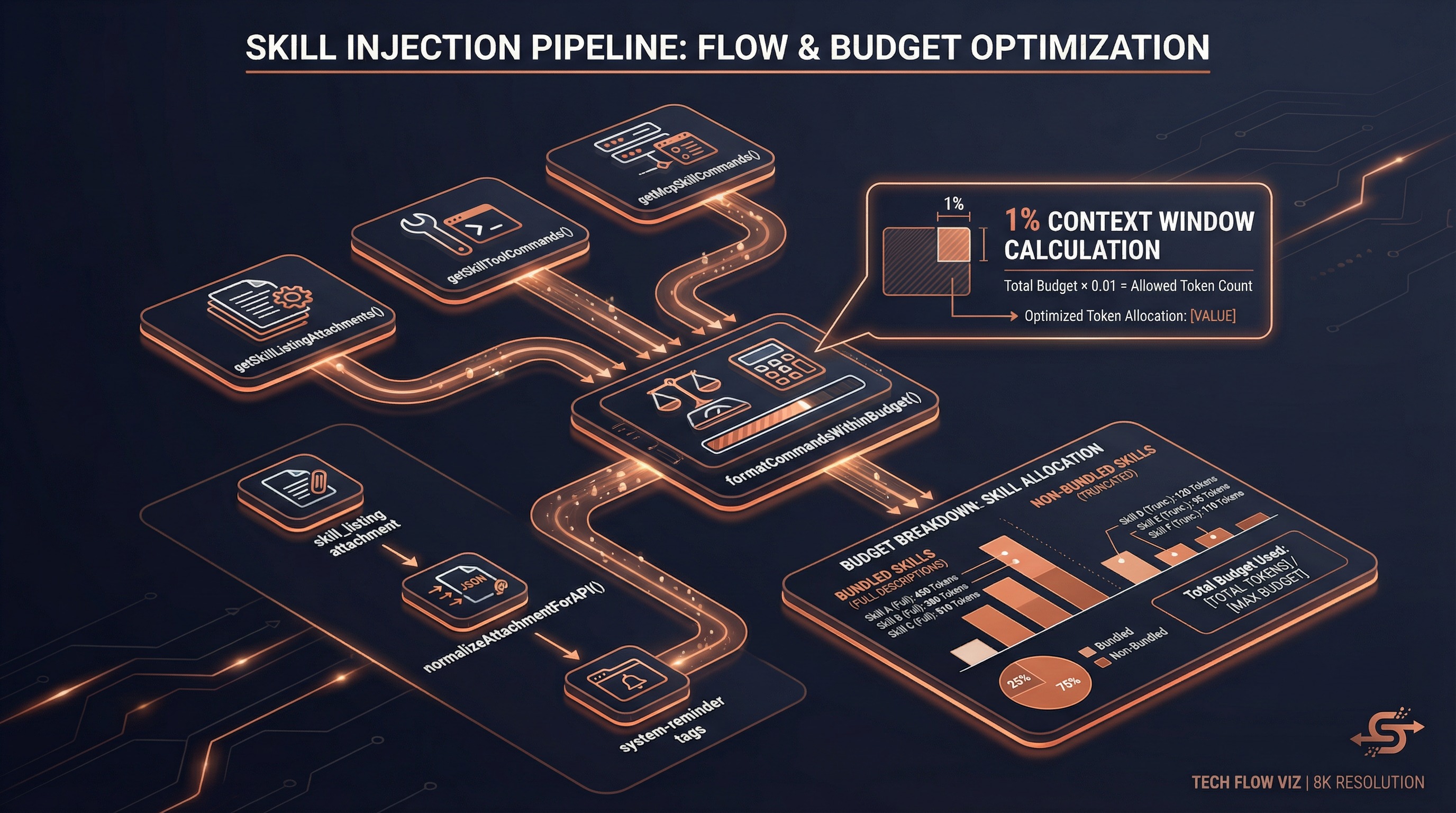
Skills 通过 system-reminder 消息注入到对话中:
每轮对话开始
    ↓
getSkillListingAttachments()          ← attachments.ts:2600-2747
    ├─ getSkillToolCommands(cwd)      ← 获取所有模型可调用 Skills
    ├─ getMcpSkillCommands()          ← 获取 MCP Skills
    ├─ sentSkillNames Map 追踪        ← 避免重复发送(per-agent)
    └─ formatCommandsWithinBudget()   ← 按上下文预算截断
    ↓
返回 Attachment:
  { type: 'skill_listing', content, skillCount, isInitial }
    ↓
normalizeAttachmentForAPI()           ← messages.ts:3732-3737
    ↓
包装为 <system-reminder> 用户消息:
  "The following skills are available for use with the Skill tool:
   - commit: Create a git commit...
   - review-pr: Review a pull request...
   - superpowers:code-reviewer: Expert code review..."
上下文预算控制
// src/tools/SkillTool/prompt.ts:21-29
export const SKILL_BUDGET_CONTEXT_PERCENT = 0.01  // 上下文窗口的 1%
export const CHARS_PER_TOKEN = 4
export const DEFAULT_CHAR_BUDGET = 8_000           // 200k × 4 × 1% 兜底
export const MAX_LISTING_DESC_CHARS = 250          // 每条描述上限
截断策略:
formatCommandsWithinBudget(commands, contextWindowTokens)
    ├─ 计算总预算 = contextWindowTokens × 4 × 1%
    ├─ 尝试全量描述
    │  └─ 总字符 ≤ 预算 → 全部输出
    │
    ├─ 分区: Bundled(不截断) + 其余
    │  ├─ Bundled Skills 始终保留完整描述
    │  └─ 其余 Skills 平分剩余预算
    │
    ├─ 截断描述 → maxDescLen 字符
    │  └─ maxDescLen < 20 → 极端情况: 非 Bundled 只显示名称
    │
    └─ 输出格式: "- skill-name: description..."
SkillTool Prompt
模型看到的工具提示词定义:
// src/tools/SkillTool/prompt.ts:173-196
export const getPrompt = memoize(async (_cwd: string): Promise<string> => {
  return `Execute a skill within the main conversation

When users ask you to perform tasks, check if any of the available skills match.

How to invoke:
- Use this tool with the skill name and optional arguments
- Examples:
  - skill: "pdf"
  - skill: "commit", args: "-m 'Fix bug'"

Important:
- Available skills are listed in system-reminder messages
- When a skill matches, invoke BEFORE generating any other response
- NEVER mention a skill without calling this tool
- Do not invoke a skill that is already running
`
})
五、SkillTool 执行引擎
工具定义
// src/tools/SkillTool/SkillTool.ts:331-340
export const SkillTool = buildTool({
  name: 'Skill',
  inputSchema: z.object({
    skill: z.string(),    // 技能名称
    args: z.string().optional(),  // 可选参数
  }),
  outputSchema: z.union([inlineOutputSchema, forkedOutputSchema]),
})
执行流程
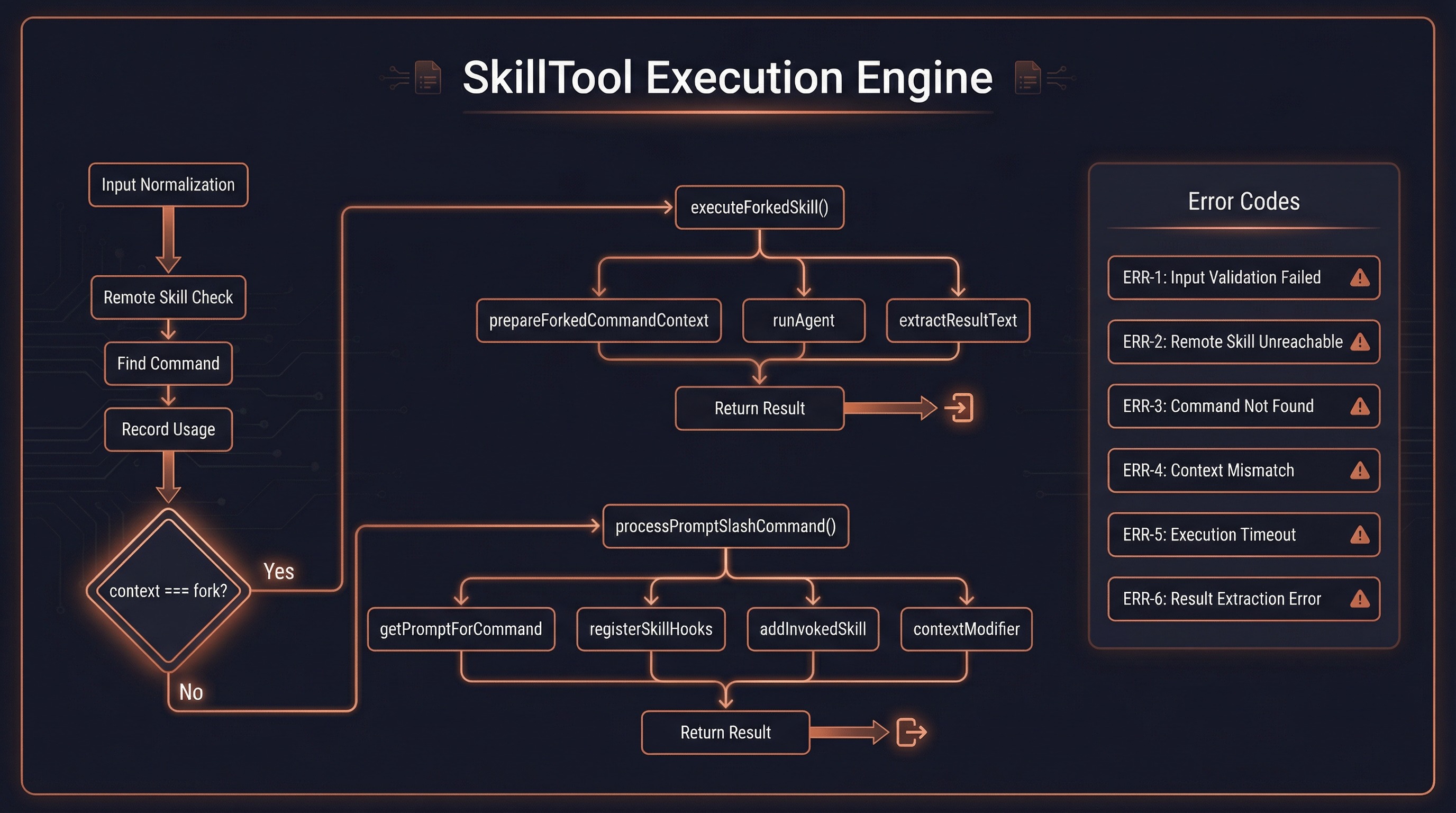
SkillTool.call({ skill, args })
    │
    ├─ 1. 标准化输入
    │  └─ 去除前导 / , trim 空白
    │
    ├─ 2. 远程 Skill 检查(实验性)
    │  └─ _canonical_<slug> 前缀 → executeRemoteSkill()
    │
    ├─ 3. 查找 Command 对象
    │  └─ getAllCommands(context) → findCommand(name, commands)
    │
    ├─ 4. 记录使用频率
    │  └─ recordSkillUsage(commandName) → 影响排序推荐
    │
    ├─ 5. 判断执行路径
    │  ├─ command.context === 'fork'
    │  │  └─ → executeForkedSkill()  [见第六节]
    │  │
    │  └─ 默认 inline
    │     ├─ processPromptSlashCommand()
    │     │  └─ getMessagesForPromptSlashCommand()
    │     │     ├─ command.getPromptForCommand(args, context)
    │     │     ├─ registerSkillHooks()      ← 注册 Hook
    │     │     ├─ addInvokedSkill()         ← 记录(压缩后恢复)
    │     │     ├─ formatCommandLoadingMetadata()
    │     │     │  └─ <command-name>/skillName</command-name>
    │     │     └─ 提取附件 → 创建消息
    │     │
    │     ├─ 提取 metadata: allowedTools, model, effort
    │     ├─ tagMessagesWithToolUseID() ← 关联 tool_use
    │     └─ 返回 { newMessages, contextModifier }
    │
    └─ 6. contextModifier() 闭包
       ├─ 更新 allowedTools
       │  └─ appState.toolPermissionContext.alwaysAllowRules.command
       ├─ 更新 model
       │  └─ resolveSkillModelOverride() 保留 [1m] 后缀
       └─ 更新 effort
          └─ appState.effortValue
验证逻辑
// src/tools/SkillTool/SkillTool.ts:354-430
async validateInput({ skill }, context) {
  // 1. 格式检查 — 非空
  // 2. 标准化 — 去除前导 /
  // 3. 远程 Skill 检查 — _canonical_ 前缀
  // 4. 查找 — findCommand() 在 getAllCommands() 中
  // 5. 禁用检查 — disableModelInvocation
  // 6. 类型检查 — 必须是 'prompt' 类型
}
错误码定义:
| errorCode | 含义 |
|---|---|
| 1 | 格式无效(空技能名) |
| 2 | 未知技能 |
| 4 | 模型调用被禁用 |
| 5 | 非 prompt 类型 |
| 6 | 远程技能未发现 |
getAllCommands — MCP Skill 合并
// src/tools/SkillTool/SkillTool.ts:81-94
async function getAllCommands(context: ToolUseContext): Promise<Command[]> {
  // 从 AppState 获取 MCP Skills(loadedFrom === 'mcp')
  const mcpSkills = context.getAppState()
    .mcp.commands.filter(
      cmd => cmd.type === 'prompt' && cmd.loadedFrom === 'mcp',
    )
  if (mcpSkills.length === 0) return getCommands(getProjectRoot())
  const localCommands = await getCommands(getProjectRoot())
  return uniqBy([...localCommands, ...mcpSkills], 'name')
}
六、Fork 子代理执行
执行流程
executeForkedSkill(command, commandName, args, context, ...)
    │
    ├─ 1. 创建子代理 ID
    │  └─ agentId = createAgentId()
    │
    ├─ 2. 遥测记录
    │  └─ logEvent('tengu_skill_tool_invocation', { execution_context: 'fork' })
    │
    ├─ 3. 准备 Fork 上下文
    │  └─ prepareForkedCommandContext(command, args, context)
    │     ├─ command.getPromptForCommand(args, context)  ← 获取技能内容
    │     ├─ parseToolListFromCLI(allowedTools)           ← 解析工具白名单
    │     ├─ createGetAppStateWithAllowedTools()          ← 修改 AppState
    │     ├─ 选择 agent: command.agent ?? 'general-purpose'
    │     └─ promptMessages = [createUserMessage(skillContent)]
    │
    ├─ 4. 合并 effort
    │  └─ command.effort → 注入 agentDefinition
    │
    ├─ 5. 运行子代理
    │  └─ for await (message of runAgent({
    │       agentDefinition,
    │       promptMessages,
    │       toolUseContext: { ...context, getAppState: modifiedGetAppState },
    │       model: command.model,
    │       override: { agentId },
    │     }))
    │     └─ 收集消息 + 报告进度 (onProgress)
    │
    ├─ 6. 提取结果
    │  └─ extractResultText(agentMessages)
    │     └─ 获取最后一条 assistant 消息的文本
    │
    └─ 7. 清理
       └─ clearInvokedSkillsForAgent(agentId)
prepareForkedCommandContext
// src/utils/forkedAgent.ts:191-232
export async function prepareForkedCommandContext(
  command: PromptCommand,
  args: string,
  context: ToolUseContext,
): Promise<PreparedForkedContext> {
  // 获取技能内容(含参数替换和 shell 执行)
  const skillPrompt = await command.getPromptForCommand(args, context)
  const skillContent = skillPrompt.map(b => b.type === 'text' ? b.text : '').join('\n')

  // 构建工具白名单
  const allowedTools = parseToolListFromCLI(command.allowedTools ?? [])
  const modifiedGetAppState = createGetAppStateWithAllowedTools(
    context.getAppState, allowedTools,
  )

  // 选择代理类型
  const agentTypeName = command.agent ?? 'general-purpose'
  const baseAgent = agents.find(a => a.agentType === agentTypeName)

  // 构建提示消息
  const promptMessages = [createUserMessage({ content: skillContent })]

  return { skillContent, modifiedGetAppState, baseAgent, promptMessages }
}
Inline vs Fork 返回差异
Inline 返回:
{
  data: {
    success: true,
    commandName: 'commit',
    allowedTools: ['Bash', 'Read'],
    model: 'sonnet',
    status: 'inline',
  },
  newMessages: [...],        // 注入到对话
  contextModifier: (ctx) => { ... },  // 修改上下文
}
Fork 返回:
{
  data: {
    success: true,
    commandName: 'verify',
    status: 'forked',
    agentId: 'agent_abc123',
    result: '验证通过,所有测试已运行...',
  },
  // 无 newMessages — 结果嵌入 tool_result block
}
七、条件激活与动态发现
条件 Skills
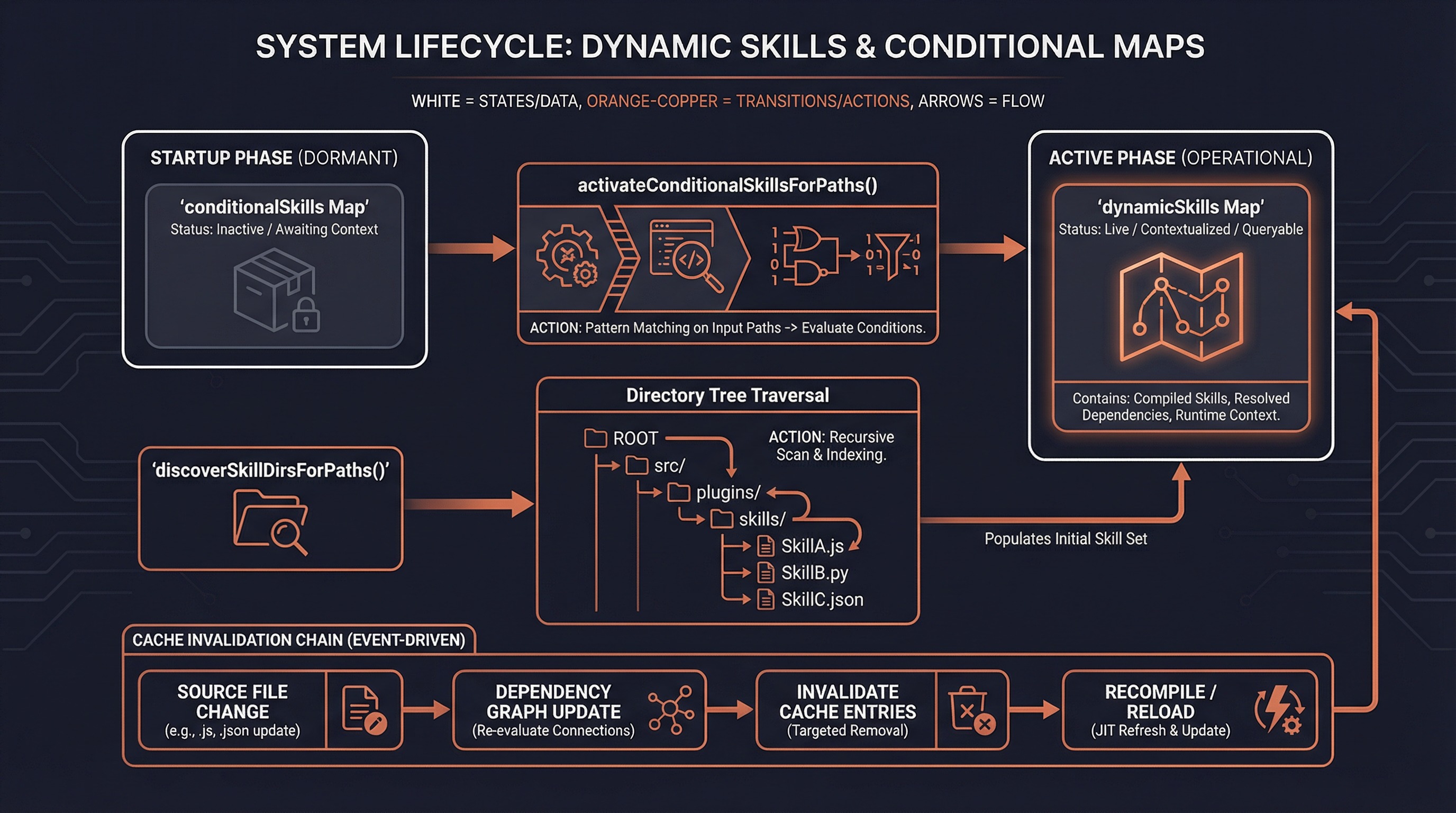
带 paths frontmatter 的 Skills 不会立即暴露给模型:
启动时
├─ 加载所有 Skills
├─ 有 paths 的 → conditionalSkills Map
└─ 无 paths 的 → 立即可用

运行时(文件操作触发)
├─ activateConditionalSkillsForPaths(filePaths, cwd)
│  ├─ 遍历 conditionalSkills Map
│  ├─ 用 ignore 库匹配 paths 模式
│  │  └─ filePath 转为 cwd 相对路径后匹配
│  ├─ 匹配成功:
│  │  ├─ 移入 dynamicSkills Map
│  │  ├─ 从 conditionalSkills 删除
│  │  ├─ 加入 activatedConditionalSkillNames Set
│  │  └─ 记录遥测 tengu_dynamic_skills_changed
│  └─ 一旦激活,会话内持续有效
└─ 通知缓存失效 → skillsLoaded.emit()
动态发现
当操作深层目录文件时,系统自动发现新的 Skills:
// src/skills/loadSkillsDir.ts:861-915
export async function discoverSkillDirsForPaths(
  filePaths: string[],
  cwd: string,
): Promise<string[]> {
  for (const filePath of filePaths) {
    let currentDir = dirname(filePath)
    // 从文件所在目录向上遍历到 cwd(不含 cwd 本身)
    while (currentDir.startsWith(resolvedCwd + pathSep)) {
      const skillDir = join(currentDir, '.claude', 'skills')
      if (!dynamicSkillDirs.has(skillDir)) {
        dynamicSkillDirs.add(skillDir)
        await fs.stat(skillDir)  // 检查是否存在
        // 检查是否被 .gitignore 忽略
        if (await isPathGitignored(currentDir, resolvedCwd)) continue
        newDirs.push(skillDir)
      }
      currentDir = dirname(currentDir)
    }
  }
  // 按深度排序(最深优先),确保就近 Skill 优先级更高
  return newDirs.sort((a, b) => b.split(pathSep).length - a.split(pathSep).length)
}
缓存失效链
动态 Skill 变化
    ↓
skillsLoaded.emit()
    ↓
clearCommandMemoizationCaches()
    ├─ loadAllCommands.cache.clear()
    ├─ getSkillToolCommands.cache.clear()
    ├─ getSlashCommandToolSkills.cache.clear()
    └─ clearSkillIndexCache()
    ↓
下一轮对话会加载新的 Skill 列表
八、Hook 集成
Hook 注册
Skills 可以通过 frontmatter 声明 Hook,在调用时自动注册为会话级 Hook:
// src/utils/hooks/registerSkillHooks.ts:20-64
export function registerSkillHooks(
  setAppState, sessionId, hooks, skillName, skillRoot?,
): void {
  for (const eventName of HOOK_EVENTS) {
    const matchers = hooks[eventName]
    if (!matchers) continue
    for (const matcher of matchers) {
      for (const hook of matcher.hooks) {
        // once: true → 执行一次后自动移除
        const onHookSuccess = hook.once
          ? () => removeSessionHook(setAppState, sessionId, eventName, hook)
          : undefined

        addSessionHook(
          setAppState, sessionId, eventName,
          matcher.matcher || '',
          hook, onHookSuccess, skillRoot,
        )
      }
    }
  }
}
Hook 生命周期
Skill 调用
    ↓
processPromptSlashCommand()
    ├─ 检查 command.hooks
    └─ registerSkillHooks(setAppState, sessionId, hooks, skillName, skillRoot)
         ├─ 遍历 HOOK_EVENTS(PreToolUse, PostToolUse, Stop, ...)
         ├─ 为每个 matcher 注册 addSessionHook()
         ├─ skillRoot → CLAUDE_PLUGIN_ROOT 环境变量
         └─ once: true → 首次执行后 removeSessionHook()
    ↓
会话期间
    ├─ 工具调用触发 PreToolUse/PostToolUse
    ├─ matcher 匹配 → 执行 Hook 命令
    └─ once: true 的 Hook 执行一次后自动移除
九、权限系统
检查流程
checkPermissions({ skill, args }, context)
    │
    ├─ 1. Deny 规则检查(最高优先级)
    │  └─ getRuleByContentsForTool(context, SkillTool, 'deny')
    │     ├─ 精确匹配: "commit" === commandName
    │     └─ 前缀匹配: "review:*" → commandName.startsWith("review")
    │
    ├─ 2. 远程 Skill 自动允许
    │  └─ _canonical_<slug> → 自动允许(Ant 专属实验性)
    │
    ├─ 3. Allow 规则检查
    │  └─ getRuleByContentsForTool(context, SkillTool, 'allow')
    │
    ├─ 4. 安全属性自动允许
    │  └─ skillHasOnlySafeProperties(command)
    │     └─ SAFE_SKILL_PROPERTIES 白名单检查
    │
    └─ 5. 默认: 询问用户
       └─ 提供建议: 精确允许 + 前缀允许
安全属性白名单
如果 Skill 只包含以下属性(无 hooks、无 allowedTools、无 fork),自动允许:
SAFE_SKILL_PROPERTIES = {
  type, name, description, contentLength, source,
  loadedFrom, progressMessage, userInvocable,
  disableModelInvocation, hasUserSpecifiedDescription,
  getPromptForCommand, userFacingName, ...
}
核心逻辑: 新增的 frontmatter 字段默认需要权限,除非显式加入白名单。
十、完整生命周期
数据流总览
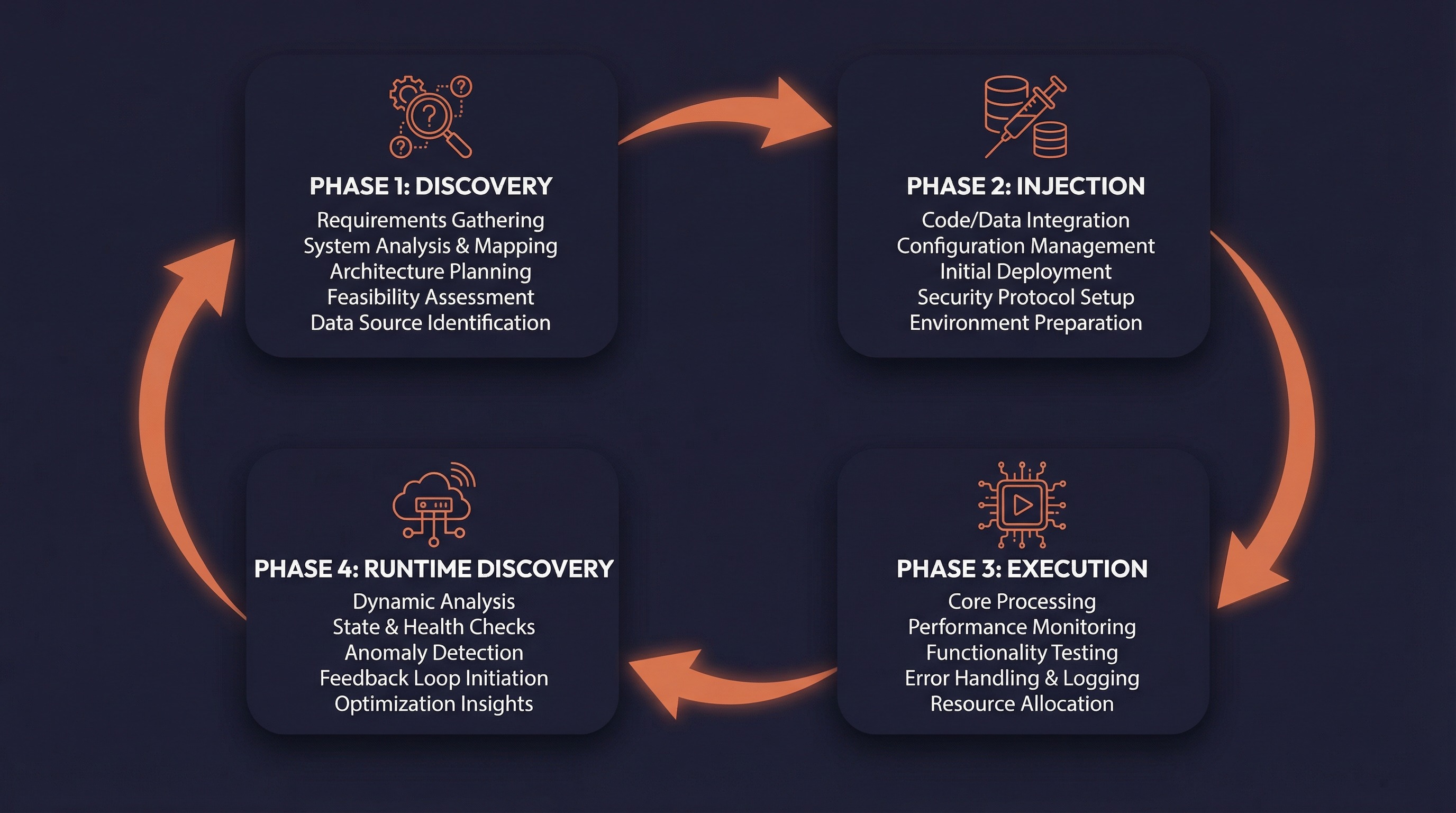
第一阶段: 发现与注册
──────────────────
CLI 启动
    ├─ initBundledSkills()        → bundledSkills[]
    ├─ getPluginSkills()          → pluginSkills[]
    ├─ getSkillDirCommands(cwd)   → skillDirCommands[]
    │  └─ 条件 Skills → conditionalSkills Map
    └─ loadAllCommands()          → 聚合 & memoize

第二阶段: 注入到对话
──────────────────
每轮对话
    ├─ getSkillListingAttachments()
    │  ├─ getSkillToolCommands()  → 过滤模型可调用 Skills
    │  ├─ getMcpSkillCommands()   → MCP Skills
    │  └─ formatCommandsWithinBudget()  → 截断到预算
    └─ 包装为 <system-reminder> 消息注入

第三阶段: 调用与执行
──────────────────
模型/用户触发
    ├─ SkillTool.validateInput()  → 验证
    ├─ SkillTool.checkPermissions()  → 权限
    └─ SkillTool.call()
       ├─ Inline → processPromptSlashCommand()
       │  ├─ getPromptForCommand()  → 内容展开
       │  ├─ registerSkillHooks()   → Hook 注册
       │  ├─ addInvokedSkill()      → 记录(压缩恢复)
       │  └─ contextModifier()      → 更新 tools/model/effort
       └─ Fork → executeForkedSkill()
          ├─ prepareForkedCommandContext()
          ├─ runAgent()             → 子代理运行
          └─ extractResultText()    → 提取结果

第四阶段: 运行时发现
──────────────────
文件操作触发
    ├─ discoverSkillDirsForPaths()   → 新 Skills 目录
    ├─ addSkillDirectories()          → 加载 & 注册
    ├─ activateConditionalSkillsForPaths()  → 条件激活
    └─ clearCommandMemoizationCaches()      → 缓存失效
Skill 内容持久化
Inline Skills 的内容通过 addInvokedSkill() 记录到会话状态,确保在上下文压缩后仍可恢复:
addInvokedSkill(name, path, content, agentId)
    ↓
存储在 session state 中
    ↓
压缩时 → buildPostCompactMessages()
    ↓
按 agentId 作用域恢复(防止跨代理泄漏)
十一、源码索引
核心文件
| 文件 | 职责 |
|---|---|
src/tools/SkillTool/SkillTool.ts | SkillTool 定义、验证、权限、执行 |
src/tools/SkillTool/prompt.ts | 工具提示词、Skill 列表格式化、预算控制 |
src/skills/loadSkillsDir.ts | 目录 Skill 发现、加载、去重、条件激活 |
src/skills/bundledSkills.ts | 内置 Skill 注册系统 |
src/skills/bundled/index.ts | 内置 Skills 初始化入口 |
src/commands.ts | 命令聚合、排序、过滤、缓存管理 |
类型定义
| 文件 | 关键类型 |
|---|---|
src/types/command.ts | PromptCommand, Command, LocalCommandResult |
src/utils/frontmatterParser.ts | FrontmatterData, ParsedMarkdown |
src/skills/bundledSkills.ts | BundledSkillDefinition |
辅助模块
| 文件 | 职责 |
|---|---|
src/utils/forkedAgent.ts | Fork 上下文准备、结果提取 |
src/utils/hooks/registerSkillHooks.ts | Skill Hook 注册 |
src/utils/argumentSubstitution.ts | 参数替换($ARGUMENTS, ${ARG1}) |
src/utils/promptShellExecution.ts | 内联 Shell 命令执行 |
src/utils/attachments.ts | Skill 列表附件生成 |
src/utils/messages.ts | system-reminder 包装 |
src/utils/plugins/loadPluginCommands.ts | 插件 Skill 加载 |
src/services/mcp/client.ts | MCP Skill 转换 |
src/skills/mcpSkillBuilders.ts | MCP Skill 构建器注册 |
关键常量
| 常量 | 值 | 位置 |
|---|---|---|
SKILL_BUDGET_CONTEXT_PERCENT | 0.01 | prompt.ts:21 |
DEFAULT_CHAR_BUDGET | 8,000 | prompt.ts:23 |
MAX_LISTING_DESC_CHARS | 250 | prompt.ts:29 |
SKILL_TOOL_NAME | 'Skill' | constants.ts |
遥测事件
| 事件 | 说明 |
|---|---|
tengu_skill_tool_invocation | Skill 调用(含 execution_context, invocation_trigger) |
tengu_skill_tool_slash_prefix | 模型使用了 / 前缀 |
tengu_dynamic_skills_changed | 动态 Skills 变化(条件激活/目录发现) |
tengu_skill_descriptions_truncated | Skill 描述被截断 |